



Could your organization’s pursuit of granular data be the primary catalyst for system instability? With Jira Cloud now enforcing a strict 700-field-per-space limit, the era of unchecked custom field proliferation has officially transitioned from a minor inconvenience to a critical strategic risk. You’ve likely experienced the frustration of custom field bloat, where every new department request results in a fresh layer of technical debt that slows down your instance and complicates cross-functional reporting. It’s a high-maintenance cycle that drains agent productivity while obscuring the very insights you’re trying to capture.
We understand that maintaining a clean, scalable environment requires a disciplined approach to data governance. By mastering Jira Forms Best Practices, you’ll learn to transition from static, field-heavy configurations to high-performance dynamic forms that drive data integrity and ITSM efficiency. This article provides a comprehensive roadmap for standardizing intake across global departments, allowing you to reduce administrative overhead and empower your teams through superior data quality, operational precision, and sustainable growth. We’ll explore how to leverage native form capabilities to orchestrate a streamlined request process that restores your instance to a state of scalable excellence.
Key Takeaways
- Discover how to mitigate system performance issues and reduce administrative overhead by replacing excessive custom fields with dynamic, high-performance form elements.
- Implement Jira Forms Best Practices to architect user-centric request portals that enhance data accuracy and completion rates through intuitive design logic.
- Establish a robust governance framework that balances centralized oversight with departmental flexibility to maintain a standardized intake process across global enterprise instances.
- Learn to enforce mandatory data points and secure audit trails to meet the rigorous regulatory compliance requirements of the pharmaceutical and financial sectors.
- Understand how professional Atlassian consulting services can accelerate your digital transformation by avoiding common implementation pitfalls and ensuring long-term operational stability.
The Strategic Shift: From Custom Field Bloat to Dynamic Jira Forms
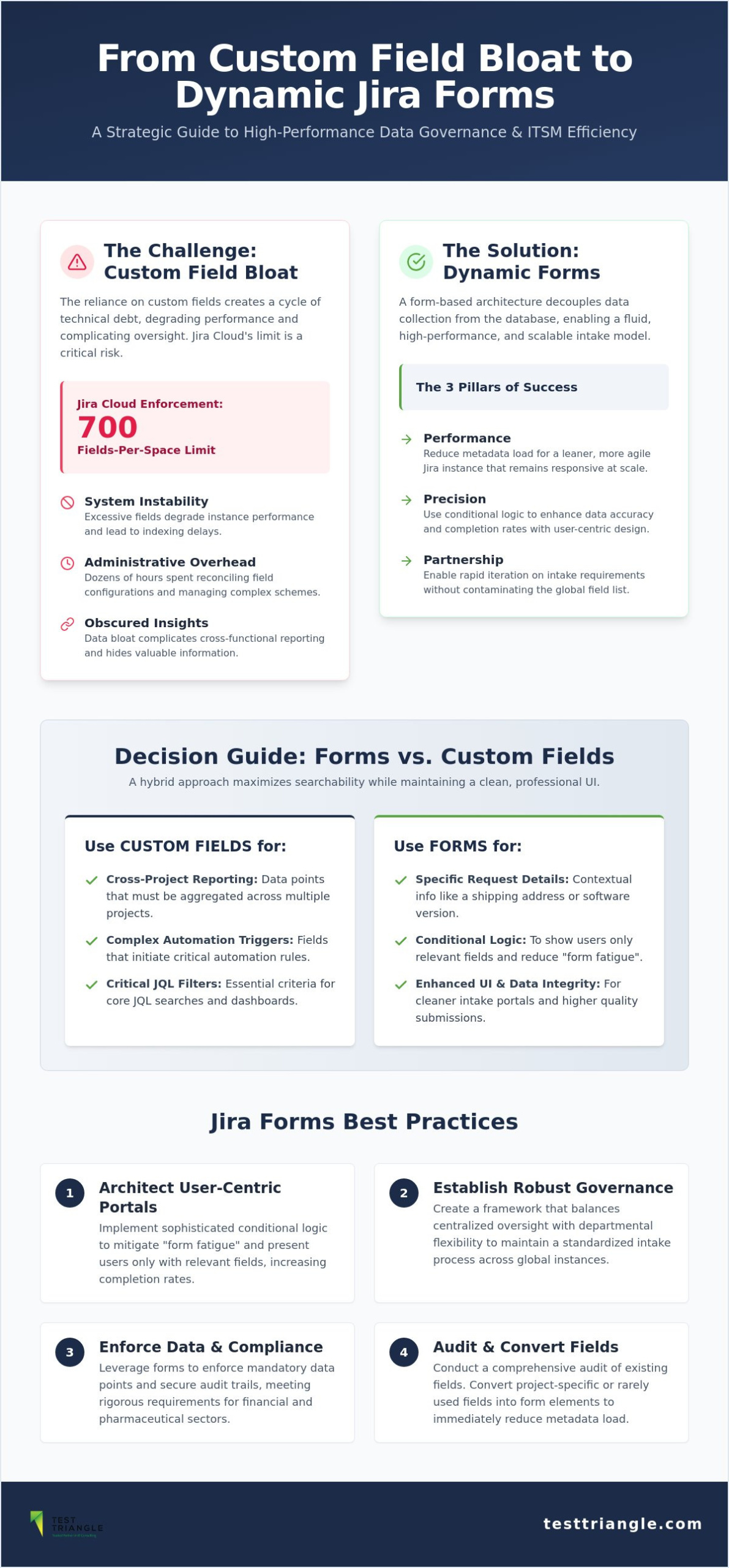
For decades, the architectural backbone of Jira (software) relied heavily on custom fields to capture every nuance of a request. However, as global enterprises scaled, this reliance evolved into a significant bottleneck, manifesting as “custom field bloat” that degrades instance performance and complicates administrative oversight. Transitioning to a form-based architecture represents a fundamental pivot from static, rigid issue screens to a fluid, dynamic intake model. By adopting Jira Forms Best Practices, organizations can decouple data collection from the underlying database schema, ensuring that the system remains responsive while providing the precision required for complex workflows. This shift fosters a more productive partnership between IT teams and business units, as it allows for rapid iteration of intake requirements without the risk of contaminating the global field list. Ultimately, this modern approach delivers three core pillars of enterprise success: Performance, Precision, and Partnership.
Reducing Technical Debt with Form-Based Architecture
Maintaining an environment with over 1,000 custom fields carries a hidden, compounding cost that many organizations fail to quantify until system performance begins to stutter. Administrators often spend dozens of hours each month merely reconciling field configurations, managing complex screen schemes, and troubleshooting indexing delays that frustrate end-users. Forms alleviate this burden by allowing teams to collect information that exists only within the context of a specific request, rather than occupying a permanent slot in the Jira database. When you leverage Atlassian implementation strategies centered on forms, you’re effectively future-proofing your instance against the 700-field-per-space limit currently enforced in Jira Cloud. To begin this transition, we recommend a comprehensive audit of existing fields to identify those that are project-specific or rarely used in high-level reporting. Converting these into form elements immediately reduces the metadata load, creating a leaner, more agile environment.
When to Use Forms vs. Custom Fields
Determining the appropriate container for your data is essential for long-term scalability and user satisfaction. Custom fields should be reserved for data points that require cross-project reporting, trigger complex automation rules, or serve as critical filters in JQL searches. Conversely, specific request details, such as a shipping address for a hardware request or a software version for a bug report, are prime candidates for forms. By following Jira Forms Best Practices, you can adopt a “Hybrid Approach” that maximizes searchability while maintaining a clean, professional UI. This strategy ensures that your most vital business metrics remain searchable and reportable, while team-specific needs are handled through flexible, dynamic forms. This distinction prevents the “one-size-fits-all” screen fatigue that often leads to inconsistent data entry and high maintenance effort for IT managers. By strategically segregating data, you empower your agents with high-quality information without overwhelming them with irrelevant fields.
Architecting Enterprise-Grade Form Design and Logic
Designing an enterprise-grade intake portal requires a shift from reactive field creation to a proactive, design-first methodology. By prioritizing the user journey, organizations can significantly increase completion rates and ensure data accuracy from the point of entry. One of the most critical Jira Forms Best Practices involves the implementation of sophisticated conditional logic to mitigate “form fatigue.” When users are presented only with the fields relevant to their specific request, the cognitive load is reduced, leading to higher-quality submissions and fewer abandoned tickets. For organizations managing intricate global workflows, leveraging Atlassian Implementation Services ensures that these complex logic builds are executed with technical rigor and long-term stability in mind. This strategic approach transforms the intake process from a simple data dump into a streamlined conversation between the requester and the service provider.
Mastering Conditional Logic and Dynamic Sections
Effective form architecture relies on clear Jira form design principles that utilize “if/then” branching to create a tailored experience. For instance, selecting “Hardware Request” should dynamically trigger sections for equipment specifications and delivery addresses, while hiding unrelated software licensing queries. It’s vital to use descriptive section headers and concise tooltips to guide the user through these transitions. However, administrators must remain vigilant against “logic loops,” which are contradictory conditions that prevent a user from progressing or successfully submitting the form. A disciplined approach to logic testing during the design phase prevents these operational friction points and ensures a seamless experience for the end-user.
Effective Data Mapping and Field Linking
To maintain reporting capabilities without sacrificing system speed, you must master the art of field mapping. Jira Forms Best Practices dictate that critical data points, such as those required for SLAs, automation triggers, or executive dashboards, should be linked directly to Jira system fields. This ensures the data remains searchable through JQL, allowing for robust performance tracking and automated routing. For supplementary information that doesn’t require global reporting, data can remain unmapped, stored securely within the form structure or rendered into an attached PDF. This selective mapping strategy preserves the integrity of your global schema while capturing the granular detail necessary for agent resolution. If your current configuration is becoming unmanageable, it may be time to speak with our strategic consultants to refine your intake architecture and restore operational clarity.
Governance and Standardization Across Global Instances
Operating at a global scale requires more than just technical tools; it demands a rigorous framework of systemic discipline to ensure that organizational growth does not lead to operational chaos. Establishing a comprehensive “Form Governance Policy” is a strategic imperative for enterprises seeking to maintain architectural integrity across multiple business units. By adhering to Jira Forms Best Practices, leadership teams can define clear boundaries for form creation, ensuring that the transition away from custom fields does not simply result in a new era of “Form Bloat.” This governance model must find a delicate balance between centralized oversight, which ensures global standards, and decentralized management, which provides individual departments with the agility they need to respond to local requirements. When properly executed, this framework acts as a steady hand, guiding the organization toward a state of scalable excellence and operational fluidity.
Standardization begins with the implementation of strict naming conventions for both forms and their linked fields. Utilizing a structured format, such as [Department]_[Process]_[Version], allows administrators to identify the purpose and owner of any given form at a glance, significantly reducing the time spent on system audits. Furthermore, establishing a formal review process for new form requests ensures that every addition to the system is necessary, well-designed, and compliant with global data standards. This proactive approach to digital transformation services prevents the accumulation of technical debt and ensures that the Jira environment remains a lean, high-performance asset for the entire enterprise.
Creating a Form Template Library
To accelerate deployment and maintain consistency, organizations should develop a centralized template library categorized by department, such as HR, Finance, IT, and Legal. This library serves as a repository of proven configurations, allowing teams to launch new intake processes with confidence and speed. Version control is a critical component of this library; it enables administrators to update form logic and fields without compromising the integrity of historical data. Sharing these Jira Forms Best Practices through an internal Atlassian Center of Excellence fosters a culture of continuous improvement, where successful strategies from one department can be easily adopted by others to drive collective efficiency.
Permission Schemes and Security for Forms
Securing your data collection processes requires a sophisticated approach to permission schemes that controls who can create, edit, and submit forms at the project level. In the context of IT service management solutions, managing the distinction between internal and external form access is paramount to protecting sensitive information while maintaining a frictionless user experience. Administrators must implement regular auditing of form changes to ensure that security protocols are followed and that no unauthorized modifications have occurred. This level of oversight provides the peace of mind that comes from knowing your digital infrastructure is both open to collaboration and resilient against risk.
Industry-Specific Compliance and Data Integrity
In highly regulated sectors such as pharmaceuticals and finance, the stakes for data collection extend far beyond simple operational efficiency; they represent a critical layer of regulatory risk management. Adhering to Jira Forms Best Practices in these environments ensures that every piece of captured data is traceable, secure, and compliant with global standards. By utilizing forms to enforce mandatory data points, organizations can create an immutable audit trail that satisfies the rigorous demands of external regulators. For those operating in compliance-heavy landscapes, our IT services for the public sector provide the specialized expertise needed to navigate these complex digital requirements with confidence. This strategic approach to data integrity transforms the intake process into a robust defense mechanism against non-compliance and systemic error.
Ensuring data privacy through field-level security and granular form access is paramount when handling sensitive information. Unlike standard issue screens that may expose data to all project users, forms allow for a more controlled environment where only authorized personnel can view or edit specific data points. This level of precision is essential for maintaining GDPR and HIPAA standards within a shared Jira instance. By segregating data at the point of entry, organizations can empower their teams to collaborate effectively while maintaining the strict confidentiality required by global privacy laws. It’s a disciplined methodology that reinforces the brand’s commitment to security and operational excellence.
Jira Forms in GxP and Validated Environments
Within Life Sciences, forms play a pivotal role in supporting 21 CFR Part 11 compliance by providing structured data entry points for change control and incident reporting. While Atlassian provides a compliant platform, achieving full regulatory alignment requires precise configuration and the strategic use of manual testing to validate form workflows against specific business requirements. This validation process ensures that electronic records remain accurate and that the system behaves predictably under audit scrutiny. By integrating these structured intake methods, companies can move away from fragmented documentation toward a centralized, validated source of truth that supports long-term operational stability and human safety.
Data Validation and Error Handling
To maintain the highest standards of data integrity, administrators should employ advanced validation techniques, such as regex (regular expressions), to prevent the entry of “dirty data.” This technical rigor ensures that sensitive information, like financial account numbers or clinical trial IDs, follows a standardized format before submission. Jira Forms Best Practices also involve setting mandatory fields that capture essential compliance data without introducing unnecessary friction for the end-user. Automating notifications when critical data is missing further strengthens the governance model, allowing for immediate corrective action. If you’re ready to fortify your compliance framework, consult with our regulatory experts today to ensure your Jira instance meets the most demanding global benchmarks.
Maximizing ITSM Efficiency with Professional Atlassian Consulting
Navigating the complexities of enterprise-scale Atlassian environments requires more than just technical configuration; it necessitates a strategic partnership that aligns tool capabilities with high-level business objectives. Expert consulting plays a pivotal role in this alignment, particularly when organizations are migrating from legacy custom field structures to modern, form-based architectures. By integrating Jira Forms Best Practices into the broader organizational workflow, professional services help teams avoid common implementation pitfalls such as redundant logic, poor data mapping, or inconsistent naming conventions. This proactive guidance accelerates return on investment by ensuring the system is architected for scalability from day one. Test Triangle’s unique approach to Atlassian Consulting focuses on delivering long-term stability through a combination of human expertise and technical precision, positioning us as a reliable collaborator in your journey toward operational excellence.
To begin this evolution, the first logical step is a comprehensive audit of your current Jira instance to identify candidates for form optimization. This process involves analyzing field usage statistics, identifying project-specific data points, and mapping out the user journey for your most frequent request types. Professional consultants provide the objective lens necessary to distinguish between essential system fields and legacy bloat that should be transitioned to dynamic forms. This audit sets the foundation for a scalable, high-performance environment that supports both current operations and future expansion, ensuring your digital infrastructure remains a lean and agile asset.
Strategic Roadmapping for Atlassian Optimization
Strategic roadmapping allows organizations to move from reactive support models to proactive system evolution. By integrating Jira Forms into a wider Digital Transformation strategy, leadership can ensure that every data intake point serves a specific, high-value purpose within the global enterprise. For organizations with limited internal bandwidth, leveraging Managed Outsourcing Services provides the continuous maintenance and optimization required to keep the instance lean. This comprehensive oversight ensures that your governance policies remain effective as your business requirements evolve, providing the peace of mind that comes from expert-led infrastructure management.
Training and Change Management for Teams
Successful adoption depends on empowering internal teams to build and manage their own forms within a strictly governed framework. Conducting rigorous user acceptance testing (UAT) for every new deployment is essential to ensure that form logic remains intuitive and error-free for the end-user. Finally, closing the loop through form analytics allows administrators to identify friction points and drive continuous improvement across all service desks. By mastering Jira Forms Best Practices through expert-led training, your teams gain the versatility needed to manage complex request types with confidence, ensuring that your digital tools act as a catalyst for growth rather than a source of technical debt.
Future-Proofing Your Enterprise Data Strategy
The transition from rigid, field-heavy configurations to a dynamic, form-centric architecture is no longer just a recommendation; it’s a strategic necessity for maintaining system performance and data integrity. By implementing Jira Forms Best Practices, your organization can effectively eliminate technical debt, enforce rigorous compliance standards, and empower teams through intuitive, logic-driven intake processes. This evolution ensures that your digital infrastructure remains a lean, agile asset capable of supporting global operations without the friction of administrative overhead or inconsistent data quality.
As an Atlassian Platinum Solution Partner with deep expertise in GxP and highly regulated industries, Test Triangle is uniquely positioned to guide your digital transformation. Our global delivery model provides the technical rigor and reliability required to manage complex digital landscapes with precision. Whether you’re navigating a large-scale migration or refining your governance policies, we remain your dedicated long-term collaborator for operational stability and growth. We look forward to helping you achieve a more scalable and efficient future.
Optimize your Jira environment with Test Triangle’s Atlassian Consulting Services to restore clarity and efficiency to your enterprise workflows today.
Frequently Asked Questions
What is the difference between Jira Forms and Custom Fields?
Jira Forms function as dynamic UI components that capture information without requiring permanent database schema changes, whereas custom fields exist as global entities that impact the entire instance. By utilizing forms, organizations can adhere to Jira Forms Best Practices by collecting project-specific details that don’t need to be indexed globally. This approach prevents system bloat and ensures that your technical infrastructure remains lean, responsive, and easy to manage.
Can I use Jira Forms in Jira Software and Jira Work Management?
Yes, Jira Forms are a native feature accessible across Jira Software, Jira Work Management, and Jira Service Management in the Cloud. This cross-platform availability empowers organizations to standardize their intake processes regardless of the specific project type. It ensures a consistent user experience while providing the technical rigor and versatility needed to manage complex enterprise workflows across diverse global departments and teams.
How do I map Jira Form fields to existing issue fields?
You map fields by selecting the “Link to a Jira field” option within the form builder’s configuration settings for each specific element. This connection ensures that form data is synchronized with system or custom fields, making the information searchable via JQL and accessible for automation. Following Jira Forms Best Practices involves mapping only critical data points to preserve system performance and maintain a clean database architecture.
Are Jira Forms available in the Jira Cloud mobile app?
Jira Forms are fully supported within the Jira Cloud mobile app for both iOS and Android devices. Users can view, edit, and submit forms directly from their smartphones or tablets, ensuring operational continuity for field-based or remote teams. This mobile accessibility supports a more versatile and globally-minded workforce by allowing for real-time data collection and request management in any professional environment.
Can I hide specific forms from certain customer groups in JSM?
You can control form visibility by associating specific forms with different Request Types within Jira Service Management. By configuring your portal settings, you can ensure that only relevant forms are presented to specific customer groups or organizations based on their needs. This granular control reduces “form fatigue” and ensures that sensitive intake processes remain secure, targeted, and aligned with your organizational governance policies.
How do Jira Forms impact system performance compared to Issue Screens?
Jira Forms offer a significantly lower performance impact than traditional issue screens because they don’t contribute to the custom field proliferation that often slows down reindexing. By housing granular data within the form layer rather than the database schema, you reduce the computational load required to render complex request types. This methodology supports a high-performance, scalable growth model that’s essential for large-scale enterprise environments.
What happens to the data if I delete a form from a Jira issue?
Deleting a form from an issue results in the permanent loss of any data stored exclusively within that form’s structure. However, any data that was linked and mapped to Jira fields will remain intact within the issue’s record. To ensure data integrity, administrators should verify that all critical information is properly mapped to system fields before removing any form attachments from an active issue.
Can I automate issue transitions based on Jira Form submissions?
You can use Jira Automation to trigger issue transitions or updates immediately upon form submission or completion. By leveraging the “Form submitted” trigger, you can orchestrate complex, multi-stage workflows that respond to new data with high precision and speed. This capability is vital for maximizing ITSM efficiency and ensuring that your request management processes are both highly automated and professionally structured.

Article by
Paul Guy
Paul serves as the Marketing Director at Test Triangle, where he leads a global team in driving growth through strategic B2B marketing and brand communications. With a strong emphasis on measurable outcomes and sustainable performance, he plays a pivotal role in aligning marketing functions to enhance customer engagement and accelerate business impact. Under his leadership, marketing initiatives have consistently delivered significant returns on investment, elevated brand visibility, and strengthened the company's presence across key markets.