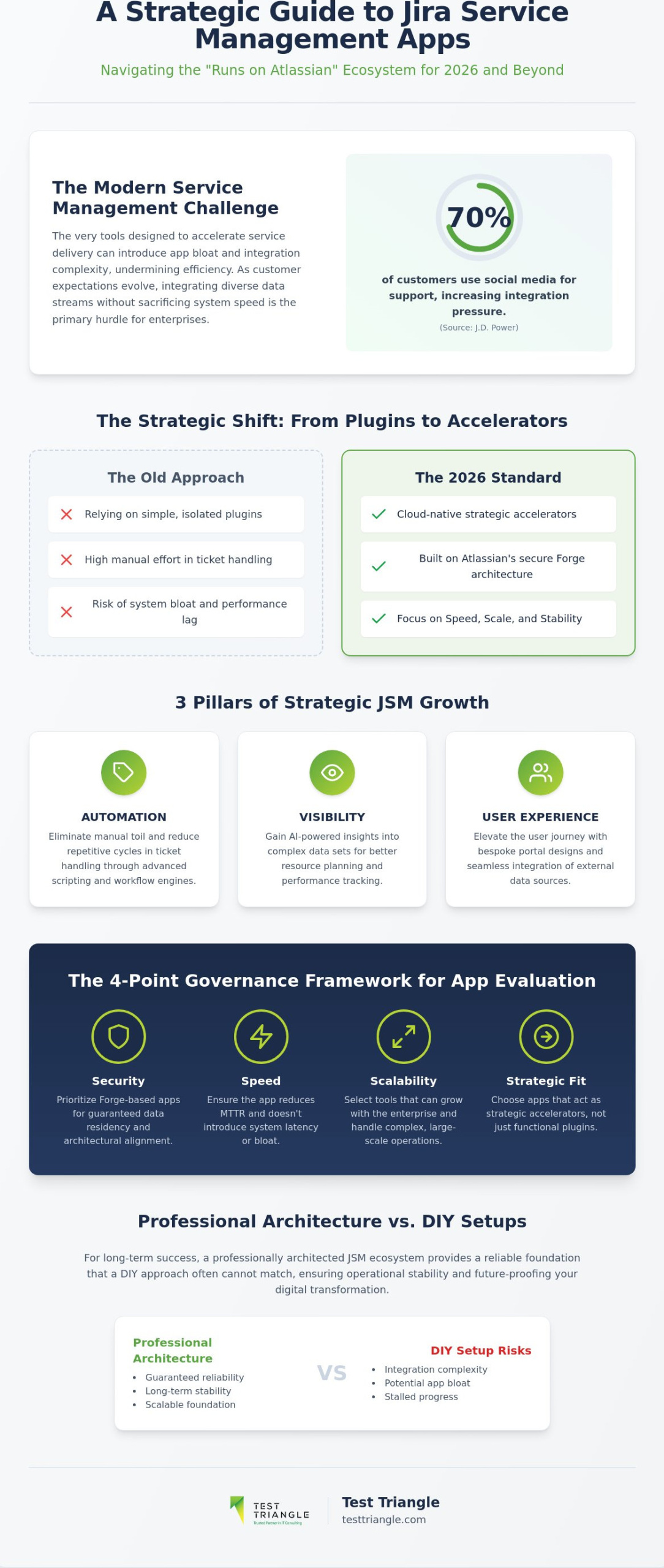
What if the very tools designed to accelerate your service delivery are actually the silent architects of your system’s latency? As you seek the Best Jira Apps for Service Management for your 2026 strategy, you’ll likely find that app bloat and integration complexity often undermine the very efficiency they’re intended to create. With 70% of customers now using social media for support according to J.D. Power, the pressure to integrate diverse data streams without sacrificing system speed has never been higher. We believe managing a complex digital infrastructure demands a disciplined, versatile, and strategic approach to tool selection.
This article provides a roadmap to help you assess the “Runs on Atlassian” ecosystem, ensuring your software choices prioritize precision, performance, and partnership. We’ll examine how AI-powered insights and native integrations can reduce manual effort while elevating your customer satisfaction scores. From Tempo’s AI-driven time tracking to the seamless data residency of Forge-based applications, you’ll discover how to build a streamlined, high-performance architecture that empowers your teams and secures your long-term operational stability.
Key Takeaways
- Understand why the 2026 landscape demands a transition from simple plugins to cloud-native strategic accelerators that align with Atlassian’s Forge architecture for enhanced security.
- Learn to achieve operational excellence by deploying advanced automation tools like ScriptRunner and JSU to reduce manual ticket handling and drive systemic efficiency.
- Discover the Best Jira Apps for Service Management to elevate the user journey through bespoke portal designs and seamless external data integration.
- Implement a rigorous governance framework using a 4-point checklist to ensure every app in your stack meets high standards for security, speed, and scalability.
- Recognize the strategic advantage of professional JSM architecture over DIY setups to guarantee a reliable, long-term foundation for your digital transformation.
The Strategic Role of Marketplace Apps in Jira Service Management
Standard Jira Service Management provides a robust foundation for ticketing, but for global enterprises, native features often represent only the starting point of a mature service strategy. The ecosystem acts as a force multiplier, transforming a centralized system into a sophisticated engine for service orchestration. By 2026, the marketplace has moved decisively toward a Cloud-first architecture, exemplified by the “Runs on Atlassian” program. This initiative ensures that the Best Jira Apps for Service Management are built on Forge, providing the security, data residency, and architectural alignment necessary for highly regulated industries. Strategic growth now rests on three pillars: automation of repetitive cycles, visibility into complex data sets, and a seamless user experience.
While out-of-the-box JSM covers essential functions, it often lacks the granular customization required for industry-specific workflows or complex third-party data integrations. Relying solely on native functionality can lead to high manual effort in repetitive ticket handling, which ultimately stalls organizational progress. To achieve true operational excellence, technical leaders must look toward specialized extensions that bridge these functional gaps. These tools aren’t mere plugins; they’re strategic accelerators that allow a business to maintain a lean core while deploying highly targeted capabilities where they matter most.
Why Enterprise Maturity Requires Ecosystem Integration
Moving beyond basic ticketing toward complex service orchestration is a hallmark of institutional maturity. As organizations scale, the need to connect IT with diverse business units becomes paramount, requiring tools that can translate technical tasks into business outcomes. Implementing advanced IT Service Management solutions often involves integrating apps that facilitate cross-departmental collaboration and automated asset management. This integration ensures that IT Service Management (ITSM) frameworks are not just theoretical models but practical, executable processes that drive long-term success and operational stability.
Defining the Value Proposition: Speed, Scale, and Stability
Marketplace value is evidenced by the over 28,000 installations of performance tools like Tempo, which signals a critical enterprise shift toward data-driven operational control and resource precision. Selecting the Best Jira Apps for Service Management requires a balance between native functionality and targeted third-party enhancements to ensure the stack remains high-performing without becoming bloated. By automating the suggestion of time entries and incident categorization, these apps play a vital role in reducing Mean Time to Resolution (MTTR). This disciplined approach to tool selection provides the peace of mind that comes from risk reduction and the empowerment found in large-scale technological evolution.
Driving Operational Excellence: Best Jira Apps for Automation and Workflow
Operational excellence in 2026 is no longer defined by the mere presence of a service desk but by the elimination of manual toil through strategic automation. While native Jira Service Management (JSM) capabilities provide a starting point, global enterprises often require more sophisticated logic to manage the strategic role of ITSM within their digital ecosystems. Selecting the Best Jira Apps for Service Management involves identifying tools that act as force multipliers, converting complex business requirements into repeatable, error-free processes. This transition from manual ticket handling to automated precision is essential for maintaining high customer satisfaction scores while scaling infrastructure.
Advanced Scripting and Logic Execution
ScriptRunner for Jira remains the industry standard for organizations demanding absolute control over their environment. Its 2026 Cloud-native features allow administrators to execute Groovy scripts that handle multi-level approval chains across disparate departments, ensuring that no request stalls due to human oversight. For even more complex logic, Power Scripts offers a robust alternative, providing a Sil-based language that simplifies the execution of intricate conditions and post-functions. These tools are foundational for DevOps Consulting initiatives, where the goal is to synchronize service desk activity with rapid development cycles. Programmatic ticket transitions and automated incident categorization reduce human error, allowing your technical teams to focus on high-value systemic improvements rather than routine maintenance.
Workflow Enhancers for Non-Technical Administrators
The 2026 Atlassian landscape has seen a significant rise in no-code automation, empowering non-technical administrators to manage complex workflows without deep coding expertise. JSU Automation Suite for Jira and Jira Miscellaneous Workflow Extensions (JMWE) provide a versatile middle ground for enterprise teams. JSU excels in simple, impactful enhancements like linked issue synchronization and copy-value post-functions, while JMWE offers deeper conditional logic via a point-and-click interface. Choosing between them depends on your specific use case: JSU is often preferred for rapid deployment across standard service desks, whereas JMWE supports more granular data manipulation. Both apps ensure that your JSM stack remains agile, allowing for the quick implementation of business-specific rules that drive down Mean Time to Resolution (MTTR).
Building a high-performance service ecosystem requires a disciplined blend of technical rigor and strategic vision. If you’re looking to refine your automation strategy, you can consult with our experts to identify the Best Jira Apps for Service Management tailored to your unique operational requirements. By integrating these advanced workflow enhancers, you secure the peace of mind that comes from a stable, scalable, and highly efficient service infrastructure.
Elevating the User Journey: Best Apps for Portal Design and Asset Management
User experience is the bridge between technical capability and business adoption. While native Jira Service Management (JSM) portals offer functional entry points, they often lack the sophisticated branding and intuitive navigation required by global organizations. To truly elevate the user journey, technical leaders must deploy the Best Jira Apps for Service Management as part of their broader IT Service Management solutions. This shift from a “ticketing interface” to a “branded experience” ensures that employees and customers find solutions quickly, which reduces the burden on support agents and improves overall sentiment across the enterprise.
Transforming the Helpdesk into a Branded Experience
Refined for Jira stands as the premier choice for organizations seeking to move beyond the constraints of standard portal layouts. By providing a customizable site-building interface, it allows administrators to structure multi-portal environments that reflect the specific branding and language of diverse global business units. This approach improves user adoption by presenting an intuitive UI that mirrors modern web experiences rather than a complex database. Integrating knowledge bases directly into the request journey ensures that users are guided toward self-service options before a ticket is even created. As discussed in recent insights regarding AI in Service Management, the focus has shifted toward human practicalities, where the interface must facilitate, not hinder, the resolution process.
Asset Management and External Data Integration
Operational excellence requires a holistic view of the digital landscape, which is often fragmented across various data silos. Elements Connect bridges this gap by allowing JSM to fetch and display external data from SQL databases, LDAP directories, or REST APIs directly within Jira fields. This capability ensures that agents have immediate access to real-time information without switching platforms. Complementing this is the 2026 evolution of Assets (formerly Insight), which provides a robust Configuration Management Database (CMDB) for hardware lifecycle and inventory control. An integrated CMDB serves as a single source of truth that reduces operational risk by providing immediate visibility into the impact of changes across the entire digital infrastructure.
Combining these tools allows for a seamless flow of information from the initial user request to the final asset update. Organizations that prioritize these integrations see a marked improvement in data accuracy and a reduction in manual data entry. By investing in these strategic extensions, you ensure your JSM environment remains a high-performance asset that scales with your enterprise’s growth. Choosing the Best Jira Apps for Service Management is not just about adding features; it’s about building a steady hand in a fast-changing technological landscape.
The Governance Framework: Evaluating Apps for Security and Scalability
Establishing a robust governance framework is the cornerstone of a high-performance JSM environment. While previous sections focused on automation and UX, the Best Jira Apps for Service Management must also be scrutinized through the lens of security, stability, and scalability. Many enterprises hesitate to move to the cloud due to concerns over data residency and third-party access; however, a disciplined evaluation process can mitigate these risks. By prioritizing apps that have achieved “Cloud Fortified” status, organizations ensure they’re partnering with vendors who adhere to rigorous security standards and reliable support protocols. This strategic approach provides the peace of mind derived from risk reduction and the empowerment found in large-scale technological evolution.
Security and Compliance in the Atlassian Marketplace
Security and compliance in the Atlassian Marketplace have evolved significantly with the introduction of the “Runs on Atlassian” program. This designation confirms that apps are built on the Forge infrastructure, ensuring better data residency and alignment with Atlassian’s core architecture. Before any installation, technical leaders should perform a comprehensive audit using the Atlassian Trust Center to verify GDPR compliance and vulnerability management practices. This rigorous vetting process is essential for maintaining the institutional maturity required in highly regulated industries. It’s a method that connects methodology to specific actions and subsequent results, ensuring your digital infrastructure remains resilient against emerging threats and regulatory shifts.
Performance Optimization and Maintenance
Performance optimization and maintenance are critical to preventing the system latency often caused by app-heavy instances. Identifying “heavy” apps that impact page load times requires continuous monitoring and a strategy for managing updates in a production environment. Consolidating functionality into fewer, more versatile tools helps reduce “App Bloat,” which can otherwise degrade the user journey discussed earlier. When selecting the Best Jira Apps for Service Management, we recommend a 4-point checklist for every new addition to your stack:
- Security: Does the app meet enterprise-grade compliance and data residency requirements?
- Support: Is the vendor a reliable collaborator with a proven track record of timely updates and official endorsements?
- Speed: Does the app maintain low latency and high precision even under extreme ticket volumes?
- Scalability: Can the tool handle the growth of a global enterprise without requiring significant re-configuration or manual intervention?
A steady hand is required to balance technical rigor with business outcomes. If you’re concerned about the security or performance of your current stack, contact our Atlassian consultants for a strategic audit of your JSM architecture. We’re deeply invested in your long-term success and operational stability, providing the expertise needed to manage complex digital infrastructures with confidence.
Implementing a Seamless Service Ecosystem with Test Triangle
The transition from a collection of fragmented tools to a unified service engine requires more than just a list of the Best Jira Apps for Service Management; it demands a strategic visionary who understands the intersection of technical rigor and business outcomes. While DIY setups often lead to the app bloat and system latency discussed in our governance framework, a professional Atlassian Implementation ensures your infrastructure is built for long-term stability. At Test Triangle, we position ourselves as a reliable collaborator, guiding global enterprises through the complexities of digital transformation with a steady hand. Our approach moves beyond simple installation, focusing instead on creating a high-performance JSM stack that empowers your teams and secures your operational excellence.
Our methodology is rooted in a disciplined three-stage progression: Analyze, Architect, Automate. By first conducting a technical audit of your existing workflows, we identify the specific gaps where automation can yield the highest ROI. We then architect a customized environment that integrates industry-leading platforms directly into your service descriptions, ensuring that every tool in your ecosystem serves a strategic purpose. This structured flow leads from a general need for improvement to a specific technical solution, mirroring the operational efficiency we promise to our clients.
Strategic Consulting for Global Enterprises
Leveraging our Atlassian Consulting Services Dublin allows organizations to access local expertise with a truly global mindset. We specialize in developing custom app extensions tailored to the highly regulated requirements of the pharmaceutical and finance industries, where data residency and security are paramount. This isn’t a one-time service but a long-term partnership focused on continuous platform optimization. As your business evolves, our consultants remain deeply invested in your success, adapting your JSM architecture to meet new challenges and technological shifts.
Managed Outsourcing and Ecosystem Support
Maintaining a complex JSM environment requires constant vigilance to ensure 24/7 stability for critical service management tools. Our Managed Outsourcing Services provide the institutional maturity needed to handle routine maintenance, app updates, and performance tuning without interrupting your core business operations. This solution-oriented style gives technical managers and executive leadership the peace of mind that their digital infrastructure is managed with expert precision. By consolidating support and maintenance under a single strategic partner, you reduce the risk of system failures and ensure a predictable, high-quality user journey.
Don’t let the complexity of the Atlassian Marketplace stall your organizational progress. A strategic audit is the first step toward a streamlined, high-performance service desk that drives real business value. Schedule your Atlassian ecosystem audit with Test Triangle today and discover how a disciplined approach to the Best Jira Apps for Service Management can transform your operational landscape.
Securing Your Strategic Service Evolution
The journey toward service maturity in 2026 requires a disciplined transition from basic ticketing to a high-performance ecosystem. By selecting the Best Jira Apps for Service Management through a rigorous governance framework, you ensure that your digital infrastructure remains resilient, scalable, and secure. We’ve explored how advanced automation, intuitive portal design, and integrated asset management serve as the foundation for operational excellence. However, the true value lies in the seamless execution of these tools within a professionally architected environment that prioritizes precision, performance, and peace of mind.
As an Atlassian Gold Solution Partner with a global presence across Europe, North America, and Asia, Test Triangle acts as a reliable long-term collaborator for enterprises navigating this complex landscape. Our strategic partnerships with industry leaders like AWS and ServiceNow allow us to deliver sophisticated, cross-platform solutions that drive systemic improvement. We’re ready to help you move beyond the risks of app bloat toward a lean, high-output service strategy. Optimize your JSM ecosystem with Test Triangle's Atlassian Consulting and empower your organization to achieve sustainable, scalable growth.
Frequently Asked Questions
What are the most essential Jira apps for a new Service Management setup?
Essential tools for a high-performance setup include ScriptRunner for advanced logic, Refined for bespoke portal design, and Assets for comprehensive CMDB functionality. These strategic accelerators transform a standard ticketing system into a sophisticated engine for service orchestration. By deploying the Best Jira Apps for Service Management early, you ensure your digital infrastructure remains resilient, scalable, and prepared for global growth.
How do I ensure a Jira Marketplace app is secure for enterprise use?
Enterprise security is verified by prioritizing apps with “Cloud Fortified” status and those built on the Forge infrastructure. This disciplined approach involves utilizing the Atlassian Trust Center to perform a technical audit of data residency and GDPR compliance before any installation occurs. Such rigor provides the peace of mind derived from risk reduction and ensures your stack meets recognized global benchmarks.
Can I use ScriptRunner for Jira Service Management automation?
ScriptRunner is highly effective for JSM automation, allowing technical teams to execute complex multi-level approval chains and programmatic ticket transitions. It acts as a force multiplier that reduces manual effort while maintaining high standards of quality and precision in ticket handling. By leveraging Groovy scripts, administrators can implement intricate business rules that native automation can’t support, driving systemic improvement across the organization.
What is the difference between Refined and the native Jira portal?
Refined provides a customizable, branded UI that improves user adoption through intuitive navigation, whereas the native Jira portal offers a standard, functional database interface. This transition from a simple helpdesk to a branded experience is vital for global organizations seeking to elevate the user journey. It allows for multi-portal environments that reflect specific branding and language requirements for diverse business units.
Do Jira apps impact the performance of my Cloud instance?
Certain “heavy” apps can impact page load times, which is why we recommend choosing Forge-based applications that run natively within Jira’s cloud infrastructure. Consolidating functionality and avoiding app bloat is essential for maintaining the operational efficiency and system speed required by large enterprises. Monitoring performance metrics ensures that your Best Jira Apps for Service Management don’t inadvertently introduce system latency.
How much do Jira apps typically cost for large teams?
Pricing for enterprise-grade apps typically follows a per-user model that scales down as team size increases. For instance, as of September 2025, Tempo Timesheets costs $5.21 per user per month for a 100-user cloud instance. This predictable, volume-based licensing allows executive leadership to anchor their technical execution costs in recognized industry benchmarks while planning for long-term operational stability.
What happens to my data if I uninstall a Jira app?
Data retention policies vary by vendor, but most Marketplace apps retain your configuration and data for a specific grace period, often 60 days, after uninstallation. We advise conducting a thorough review of the vendor’s data privacy policy to ensure long-term compliance and security. This technical audit is a cornerstone of a mature governance framework, protecting your institutional data during platform transitions.
Can I build my own custom Jira app for Service Management?
Global enterprises can indeed build custom apps using the Atlassian Forge platform to address unique pharmaceutical or financial requirements. This approach allows for the creation of secure, natively integrated tools that align perfectly with your specific business outcomes and technical needs. Custom development ensures organizational progress through a combination of human expertise and technical precision, tailored to your unique service ecosystem.

Article by
Paul Guy
Paul serves as the Marketing Director at Test Triangle, where he leads a global team in driving growth through strategic B2B marketing and brand communications. With a strong emphasis on measurable outcomes and sustainable performance, he plays a pivotal role in aligning marketing functions to enhance customer engagement and accelerate business impact. Under his leadership, marketing initiatives have consistently delivered significant returns on investment, elevated brand visibility, and strengthened the company's presence across key markets.