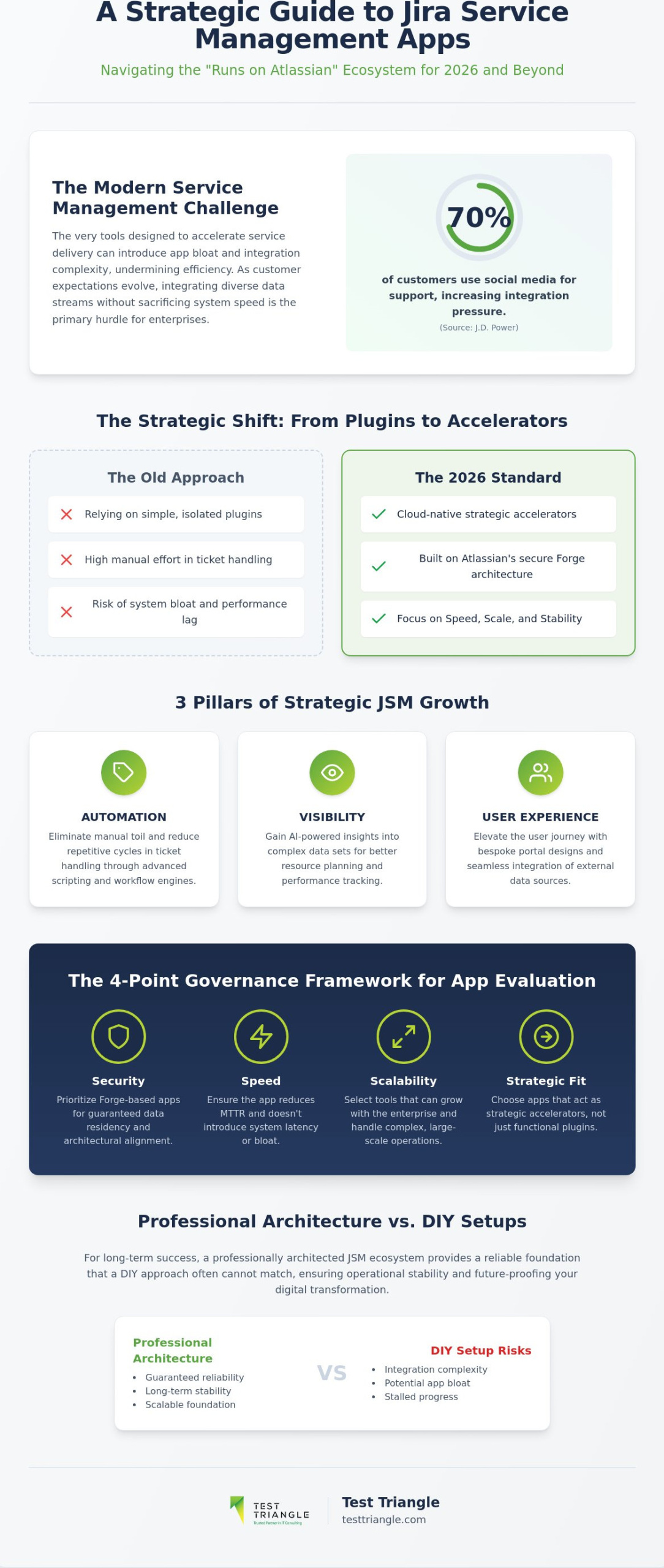
What if the very tools designed to accelerate your service delivery are actually the silent architects of your system’s latency? As you seek the Best Jira Apps for Service Management for your 2026 strategy, you’ll likely find that app bloat and integration complexity often undermine the very efficiency they’re intended to create. With 70% of customers now using social media for support according to J.D. Power, the pressure to integrate diverse data streams without sacrificing system speed has never been higher. We believe managing a complex digital infrastructure demands a disciplined, versatile, and strategic approach to tool selection.

This article provides a roadmap to help you assess the “Runs on Atlassian” ecosystem, ensuring your software choices prioritize precision, performance, and partnership. We’ll examine how AI-powered insights and native integrations can reduce manual effort while elevating your customer satisfaction scores. From Tempo’s AI-driven time tracking to the seamless data residency of Forge-based applications, you’ll discover how to build a streamlined, high-performance architecture that empowers your teams and secures your long-term operational stability.

Key Takeaways

  • Understand why the 2026 landscape demands a transition from simple plugins to cloud-native strategic accelerators that align with Atlassian’s Forge architecture for enhanced security.
  • Learn to achieve operational excellence by deploying advanced automation tools like ScriptRunner and JSU to reduce manual ticket handling and drive systemic efficiency.
  • Discover the Best Jira Apps for Service Management to elevate the user journey through bespoke portal designs and seamless external data integration.
  • Implement a rigorous governance framework using a 4-point checklist to ensure every app in your stack meets high standards for security, speed, and scalability.
  • Recognize the strategic advantage of professional JSM architecture over DIY setups to guarantee a reliable, long-term foundation for your digital transformation.

The Strategic Role of Marketplace Apps in Jira Service Management

Standard Jira Service Management provides a robust foundation for ticketing, but for global enterprises, native features often represent only the starting point of a mature service strategy. The ecosystem acts as a force multiplier, transforming a centralized system into a sophisticated engine for service orchestration. By 2026, the marketplace has moved decisively toward a Cloud-first architecture, exemplified by the “Runs on Atlassian” program. This initiative ensures that the Best Jira Apps for Service Management are built on Forge, providing the security, data residency, and architectural alignment necessary for highly regulated industries. Strategic growth now rests on three pillars: automation of repetitive cycles, visibility into complex data sets, and a seamless user experience.

While out-of-the-box JSM covers essential functions, it often lacks the granular customization required for industry-specific workflows or complex third-party data integrations. Relying solely on native functionality can lead to high manual effort in repetitive ticket handling, which ultimately stalls organizational progress. To achieve true operational excellence, technical leaders must look toward specialized extensions that bridge these functional gaps. These tools aren’t mere plugins; they’re strategic accelerators that allow a business to maintain a lean core while deploying highly targeted capabilities where they matter most.

Why Enterprise Maturity Requires Ecosystem Integration

Moving beyond basic ticketing toward complex service orchestration is a hallmark of institutional maturity. As organizations scale, the need to connect IT with diverse business units becomes paramount, requiring tools that can translate technical tasks into business outcomes. Implementing advanced IT Service Management solutions often involves integrating apps that facilitate cross-departmental collaboration and automated asset management. This integration ensures that IT Service Management (ITSM) frameworks are not just theoretical models but practical, executable processes that drive long-term success and operational stability.

Defining the Value Proposition: Speed, Scale, and Stability

Marketplace value is evidenced by the over 28,000 installations of performance tools like Tempo, which signals a critical enterprise shift toward data-driven operational control and resource precision. Selecting the Best Jira Apps for Service Management requires a balance between native functionality and targeted third-party enhancements to ensure the stack remains high-performing without becoming bloated. By automating the suggestion of time entries and incident categorization, these apps play a vital role in reducing Mean Time to Resolution (MTTR). This disciplined approach to tool selection provides the peace of mind that comes from risk reduction and the empowerment found in large-scale technological evolution.

Driving Operational Excellence: Best Jira Apps for Automation and Workflow

Operational excellence in 2026 is no longer defined by the mere presence of a service desk but by the elimination of manual toil through strategic automation. While native Jira Service Management (JSM) capabilities provide a starting point, global enterprises often require more sophisticated logic to manage the strategic role of ITSM within their digital ecosystems. Selecting the Best Jira Apps for Service Management involves identifying tools that act as force multipliers, converting complex business requirements into repeatable, error-free processes. This transition from manual ticket handling to automated precision is essential for maintaining high customer satisfaction scores while scaling infrastructure.

Advanced Scripting and Logic Execution

ScriptRunner for Jira remains the industry standard for organizations demanding absolute control over their environment. Its 2026 Cloud-native features allow administrators to execute Groovy scripts that handle multi-level approval chains across disparate departments, ensuring that no request stalls due to human oversight. For even more complex logic, Power Scripts offers a robust alternative, providing a Sil-based language that simplifies the execution of intricate conditions and post-functions. These tools are foundational for DevOps Consulting initiatives, where the goal is to synchronize service desk activity with rapid development cycles. Programmatic ticket transitions and automated incident categorization reduce human error, allowing your technical teams to focus on high-value systemic improvements rather than routine maintenance.

Workflow Enhancers for Non-Technical Administrators

The 2026 Atlassian landscape has seen a significant rise in no-code automation, empowering non-technical administrators to manage complex workflows without deep coding expertise. JSU Automation Suite for Jira and Jira Miscellaneous Workflow Extensions (JMWE) provide a versatile middle ground for enterprise teams. JSU excels in simple, impactful enhancements like linked issue synchronization and copy-value post-functions, while JMWE offers deeper conditional logic via a point-and-click interface. Choosing between them depends on your specific use case: JSU is often preferred for rapid deployment across standard service desks, whereas JMWE supports more granular data manipulation. Both apps ensure that your JSM stack remains agile, allowing for the quick implementation of business-specific rules that drive down Mean Time to Resolution (MTTR).

Building a high-performance service ecosystem requires a disciplined blend of technical rigor and strategic vision. If you’re looking to refine your automation strategy, you can consult with our experts to identify the Best Jira Apps for Service Management tailored to your unique operational requirements. By integrating these advanced workflow enhancers, you secure the peace of mind that comes from a stable, scalable, and highly efficient service infrastructure.

Elevating the User Journey: Best Apps for Portal Design and Asset Management

User experience is the bridge between technical capability and business adoption. While native Jira Service Management (JSM) portals offer functional entry points, they often lack the sophisticated branding and intuitive navigation required by global organizations. To truly elevate the user journey, technical leaders must deploy the Best Jira Apps for Service Management as part of their broader IT Service Management solutions. This shift from a “ticketing interface” to a “branded experience” ensures that employees and customers find solutions quickly, which reduces the burden on support agents and improves overall sentiment across the enterprise.

Transforming the Helpdesk into a Branded Experience

Refined for Jira stands as the premier choice for organizations seeking to move beyond the constraints of standard portal layouts. By providing a customizable site-building interface, it allows administrators to structure multi-portal environments that reflect the specific branding and language of diverse global business units. This approach improves user adoption by presenting an intuitive UI that mirrors modern web experiences rather than a complex database. Integrating knowledge bases directly into the request journey ensures that users are guided toward self-service options before a ticket is even created. As discussed in recent insights regarding AI in Service Management, the focus has shifted toward human practicalities, where the interface must facilitate, not hinder, the resolution process.

Asset Management and External Data Integration

Operational excellence requires a holistic view of the digital landscape, which is often fragmented across various data silos. Elements Connect bridges this gap by allowing JSM to fetch and display external data from SQL databases, LDAP directories, or REST APIs directly within Jira fields. This capability ensures that agents have immediate access to real-time information without switching platforms. Complementing this is the 2026 evolution of Assets (formerly Insight), which provides a robust Configuration Management Database (CMDB) for hardware lifecycle and inventory control. An integrated CMDB serves as a single source of truth that reduces operational risk by providing immediate visibility into the impact of changes across the entire digital infrastructure.

Combining these tools allows for a seamless flow of information from the initial user request to the final asset update. Organizations that prioritize these integrations see a marked improvement in data accuracy and a reduction in manual data entry. By investing in these strategic extensions, you ensure your JSM environment remains a high-performance asset that scales with your enterprise’s growth. Choosing the Best Jira Apps for Service Management is not just about adding features; it’s about building a steady hand in a fast-changing technological landscape.

The Governance Framework: Evaluating Apps for Security and Scalability

Establishing a robust governance framework is the cornerstone of a high-performance JSM environment. While previous sections focused on automation and UX, the Best Jira Apps for Service Management must also be scrutinized through the lens of security, stability, and scalability. Many enterprises hesitate to move to the cloud due to concerns over data residency and third-party access; however, a disciplined evaluation process can mitigate these risks. By prioritizing apps that have achieved “Cloud Fortified” status, organizations ensure they’re partnering with vendors who adhere to rigorous security standards and reliable support protocols. This strategic approach provides the peace of mind derived from risk reduction and the empowerment found in large-scale technological evolution.

Security and Compliance in the Atlassian Marketplace

Security and compliance in the Atlassian Marketplace have evolved significantly with the introduction of the “Runs on Atlassian” program. This designation confirms that apps are built on the Forge infrastructure, ensuring better data residency and alignment with Atlassian’s core architecture. Before any installation, technical leaders should perform a comprehensive audit using the Atlassian Trust Center to verify GDPR compliance and vulnerability management practices. This rigorous vetting process is essential for maintaining the institutional maturity required in highly regulated industries. It’s a method that connects methodology to specific actions and subsequent results, ensuring your digital infrastructure remains resilient against emerging threats and regulatory shifts.

Performance Optimization and Maintenance

Performance optimization and maintenance are critical to preventing the system latency often caused by app-heavy instances. Identifying “heavy” apps that impact page load times requires continuous monitoring and a strategy for managing updates in a production environment. Consolidating functionality into fewer, more versatile tools helps reduce “App Bloat,” which can otherwise degrade the user journey discussed earlier. When selecting the Best Jira Apps for Service Management, we recommend a 4-point checklist for every new addition to your stack:

  • Security: Does the app meet enterprise-grade compliance and data residency requirements?
  • Support: Is the vendor a reliable collaborator with a proven track record of timely updates and official endorsements?
  • Speed: Does the app maintain low latency and high precision even under extreme ticket volumes?
  • Scalability: Can the tool handle the growth of a global enterprise without requiring significant re-configuration or manual intervention?

A steady hand is required to balance technical rigor with business outcomes. If you’re concerned about the security or performance of your current stack, contact our Atlassian consultants for a strategic audit of your JSM architecture. We’re deeply invested in your long-term success and operational stability, providing the expertise needed to manage complex digital infrastructures with confidence.
Best Jira Apps for Service Management: Top 2026 Picks

Implementing a Seamless Service Ecosystem with Test Triangle

The transition from a collection of fragmented tools to a unified service engine requires more than just a list of the Best Jira Apps for Service Management; it demands a strategic visionary who understands the intersection of technical rigor and business outcomes. While DIY setups often lead to the app bloat and system latency discussed in our governance framework, a professional Atlassian Implementation ensures your infrastructure is built for long-term stability. At Test Triangle, we position ourselves as a reliable collaborator, guiding global enterprises through the complexities of digital transformation with a steady hand. Our approach moves beyond simple installation, focusing instead on creating a high-performance JSM stack that empowers your teams and secures your operational excellence.

Our methodology is rooted in a disciplined three-stage progression: Analyze, Architect, Automate. By first conducting a technical audit of your existing workflows, we identify the specific gaps where automation can yield the highest ROI. We then architect a customized environment that integrates industry-leading platforms directly into your service descriptions, ensuring that every tool in your ecosystem serves a strategic purpose. This structured flow leads from a general need for improvement to a specific technical solution, mirroring the operational efficiency we promise to our clients.

Strategic Consulting for Global Enterprises

Leveraging our Atlassian Consulting Services Dublin allows organizations to access local expertise with a truly global mindset. We specialize in developing custom app extensions tailored to the highly regulated requirements of the pharmaceutical and finance industries, where data residency and security are paramount. This isn’t a one-time service but a long-term partnership focused on continuous platform optimization. As your business evolves, our consultants remain deeply invested in your success, adapting your JSM architecture to meet new challenges and technological shifts.

Managed Outsourcing and Ecosystem Support

Maintaining a complex JSM environment requires constant vigilance to ensure 24/7 stability for critical service management tools. Our Managed Outsourcing Services provide the institutional maturity needed to handle routine maintenance, app updates, and performance tuning without interrupting your core business operations. This solution-oriented style gives technical managers and executive leadership the peace of mind that their digital infrastructure is managed with expert precision. By consolidating support and maintenance under a single strategic partner, you reduce the risk of system failures and ensure a predictable, high-quality user journey.

Don’t let the complexity of the Atlassian Marketplace stall your organizational progress. A strategic audit is the first step toward a streamlined, high-performance service desk that drives real business value. Schedule your Atlassian ecosystem audit with Test Triangle today and discover how a disciplined approach to the Best Jira Apps for Service Management can transform your operational landscape.

Securing Your Strategic Service Evolution

The journey toward service maturity in 2026 requires a disciplined transition from basic ticketing to a high-performance ecosystem. By selecting the Best Jira Apps for Service Management through a rigorous governance framework, you ensure that your digital infrastructure remains resilient, scalable, and secure. We’ve explored how advanced automation, intuitive portal design, and integrated asset management serve as the foundation for operational excellence. However, the true value lies in the seamless execution of these tools within a professionally architected environment that prioritizes precision, performance, and peace of mind.

As an Atlassian Gold Solution Partner with a global presence across Europe, North America, and Asia, Test Triangle acts as a reliable long-term collaborator for enterprises navigating this complex landscape. Our strategic partnerships with industry leaders like AWS and ServiceNow allow us to deliver sophisticated, cross-platform solutions that drive systemic improvement. We’re ready to help you move beyond the risks of app bloat toward a lean, high-output service strategy. Optimize your JSM ecosystem with Test Triangle's Atlassian Consulting and empower your organization to achieve sustainable, scalable growth.

Frequently Asked Questions

What are the most essential Jira apps for a new Service Management setup?

Essential tools for a high-performance setup include ScriptRunner for advanced logic, Refined for bespoke portal design, and Assets for comprehensive CMDB functionality. These strategic accelerators transform a standard ticketing system into a sophisticated engine for service orchestration. By deploying the Best Jira Apps for Service Management early, you ensure your digital infrastructure remains resilient, scalable, and prepared for global growth.

How do I ensure a Jira Marketplace app is secure for enterprise use?

Enterprise security is verified by prioritizing apps with “Cloud Fortified” status and those built on the Forge infrastructure. This disciplined approach involves utilizing the Atlassian Trust Center to perform a technical audit of data residency and GDPR compliance before any installation occurs. Such rigor provides the peace of mind derived from risk reduction and ensures your stack meets recognized global benchmarks.

Can I use ScriptRunner for Jira Service Management automation?

ScriptRunner is highly effective for JSM automation, allowing technical teams to execute complex multi-level approval chains and programmatic ticket transitions. It acts as a force multiplier that reduces manual effort while maintaining high standards of quality and precision in ticket handling. By leveraging Groovy scripts, administrators can implement intricate business rules that native automation can’t support, driving systemic improvement across the organization.

What is the difference between Refined and the native Jira portal?

Refined provides a customizable, branded UI that improves user adoption through intuitive navigation, whereas the native Jira portal offers a standard, functional database interface. This transition from a simple helpdesk to a branded experience is vital for global organizations seeking to elevate the user journey. It allows for multi-portal environments that reflect specific branding and language requirements for diverse business units.

Do Jira apps impact the performance of my Cloud instance?

Certain “heavy” apps can impact page load times, which is why we recommend choosing Forge-based applications that run natively within Jira’s cloud infrastructure. Consolidating functionality and avoiding app bloat is essential for maintaining the operational efficiency and system speed required by large enterprises. Monitoring performance metrics ensures that your Best Jira Apps for Service Management don’t inadvertently introduce system latency.

How much do Jira apps typically cost for large teams?

Pricing for enterprise-grade apps typically follows a per-user model that scales down as team size increases. For instance, as of September 2025, Tempo Timesheets costs $5.21 per user per month for a 100-user cloud instance. This predictable, volume-based licensing allows executive leadership to anchor their technical execution costs in recognized industry benchmarks while planning for long-term operational stability.

What happens to my data if I uninstall a Jira app?

Data retention policies vary by vendor, but most Marketplace apps retain your configuration and data for a specific grace period, often 60 days, after uninstallation. We advise conducting a thorough review of the vendor’s data privacy policy to ensure long-term compliance and security. This technical audit is a cornerstone of a mature governance framework, protecting your institutional data during platform transitions.

Can I build my own custom Jira app for Service Management?

Global enterprises can indeed build custom apps using the Atlassian Forge platform to address unique pharmaceutical or financial requirements. This approach allows for the creation of secure, natively integrated tools that align perfectly with your specific business outcomes and technical needs. Custom development ensures organizational progress through a combination of human expertise and technical precision, tailored to your unique service ecosystem.

Paul Guy

Article by

Paul Guy

Paul serves as the Marketing Director at Test Triangle, where he leads a global team in driving growth through strategic B2B marketing and brand communications. With a strong emphasis on measurable outcomes and sustainable performance, he plays a pivotal role in aligning marketing functions to enhance customer engagement and accelerate business impact. Under his leadership, marketing initiatives have consistently delivered significant returns on investment, elevated brand visibility, and strengthened the company's presence across key markets.

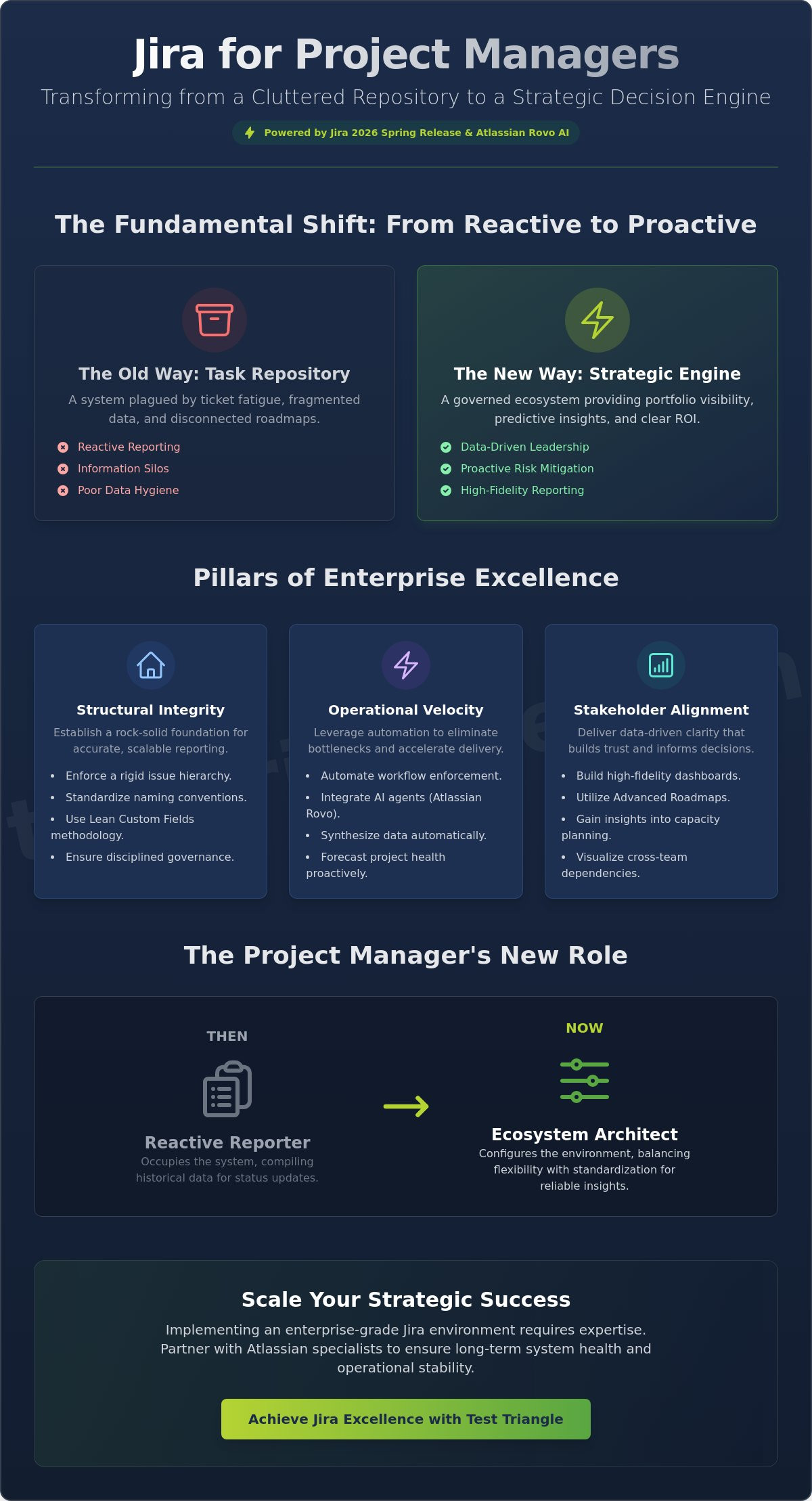
What if your Jira instance functioned as a high-fidelity strategic engine rather than a cluttered repository for forgotten tasks? Most project leaders today struggle with “ticket fatigue” and fragmented data integrity, which often makes reliable reporting feel like an unattainable goal. You likely recognize the frustration of tracking complex cross-team dependencies while executive roadmaps remain disconnected from daily development cycles. By mastering jira for project managers best practices, you can bridge this critical gap; transforming your environment into a governed ecosystem that provides clear visibility into project health and ROI.

This guide provides a comprehensive roadmap for leveraging the Jira 2026 Spring Release to achieve enterprise-level excellence. You’ll learn how to integrate Atlassian Rovo’s AI agents into your workflows to automate the heavy lifting of data synthesis and reporting. By aligning technical execution with high-level business outcomes, we’ll demonstrate how to move beyond simple task tracking toward a sophisticated governance model that stakeholders actually trust and rely upon for long-term stability.

Key Takeaways

  • Reframe Jira as a strategic decision engine that enables data-driven leadership by providing comprehensive portfolio visibility and proactive risk mitigation.
  • Establish foundational structural integrity by enforcing a rigid issue hierarchy and standardized naming conventions, ensuring reporting accuracy across complex enterprise environments.
  • Accelerate operational velocity through the implementation of jira for project managers best practices, leveraging automation to enforce governance while eliminating workflow bottlenecks.
  • Drive stakeholder alignment with high-fidelity executive dashboards and Advanced Roadmaps that offer deep insights into capacity planning and cross-team dependencies.
  • Scale your digital infrastructure effectively by evaluating the strategic benefits of expert Atlassian Consulting or Managed Outsourcing Services to maintain long-term system health and operational stability.

Beyond Task Tracking: The Strategic Role of Jira for Project Managers

Jira has evolved far beyond its origins as a simple bug tracker; in the current enterprise landscape, it serves as a sophisticated strategic decision engine that empowers data-driven leadership. While many teams remain stuck in the tactical minutiae of moving tickets across a board, high-performing project managers recognize that true excellence requires a shift toward strategic portfolio visibility. By utilizing this Jira software overview to understand the platform’s foundational capabilities, leaders can begin to implement jira for project managers best practices that prioritize risk mitigation over mere task completion. In 2026, this shift is accelerated by the integration of AI-powered orchestration tools like Atlassian Rovo. These tools transform static data into predictive analytics that forecast project health before bottlenecks occur, allowing the PM to move from a reactive reporter to a proactive strategist.

The platform now functions as the primary source of truth for cross-functional alignment, bridging the gap between disparate departments. When configured correctly, Jira ensures that executive roadmaps aren’t just aspirational documents but are directly linked to the real-time velocity of development squads. This connectivity eliminates the “information silos” that typically plague large organizations, providing a transparent view of how individual tasks contribute to broader corporate milestones.

The PM as the Ecosystem Architect

A successful project manager must lead the configuration of the Jira environment rather than simply occupying it. Acting as an ecosystem architect, the PM establishes the vital balance between team-level flexibility and organizational standardization. If every team operates with unique, non-standardized statuses, executive-level reporting becomes impossible to aggregate. Poor Jira hygiene, such as stale tickets or inconsistent field usage, directly degrades the accuracy of ROI calculations. By enforcing disciplined data standards, the PM ensures that the system provides reliable insights that support stable, scalable growth.

Bridging the Gap Between DevOps and Business Value

Modern project management requires mapping technical velocity to tangible business outcomes and revenue drivers. It’s not enough to track how many story points were completed; the system must demonstrate how those points translate into market readiness or operational efficiency. Applying DevOps Consulting principles to Jira project structures allows for a seamless flow of information from the code repository to the boardroom. This approach creates a narrative through tickets that stakeholders can easily understand, framing technical progress in the language of business value and strategic impact.

Engineering Structural Integrity: Governance and Hierarchy Best Practices

Establishing structural integrity within Jira requires a disciplined approach to governance that transcends simple project setup. To achieve enterprise excellence, project leaders must enforce a rigid issue hierarchy that connects granular tasks to overarching corporate strategy. By implementing Atlassian Implementation standards, organizations can ensure their environment scales without the technical debt often caused by field sprawl. A core component of jira for project managers best practices involves the use of Lean Custom Fields; this methodology maintains system performance by restricting data collection to essential, reportable metrics rather than allowing every team to invent unique parameters.

Effective governance also requires a robust integration strategy with other enterprise platforms. In many mature environments, Jira does not exist in a vacuum; it must synchronize with ITSM tools to provide a holistic view of the service lifecycle. Integrating Jira with ServiceNow ensures that development velocity is balanced with operational stability, creating a unified ecosystem for change management. This level of cross-platform cohesion is essential for maintaining a single source of truth across the entire digital infrastructure. Utilizing Jira Components further enhances this structure by allowing project managers to track cross-cutting themes without the need to create redundant, fragmented projects.

Defining the Enterprise Hierarchy

A well-defined hierarchy serves as the cornerstone of Agile project governance. Initiatives represent high-level corporate objectives, while Epics should be sized to represent manageable phases of work. Adopting these jira for project managers best practices helps prevent zombie epics that linger across multiple quarters; these artifacts often dilute the clarity of progress reports. Sub-tasks should be utilized sparingly; they’re ideal for discrete checklists within a story but can complicate capacity planning if they become the primary unit of work.

Permission Schemes and Security Governance

Security within Jira must be governed by the principle of least privilege. This ensures that sensitive project data remains accessible only to authorized personnel, which is particularly critical when managing offshore resources or external collaborators. Standardizing project roles across the instance simplifies the auditing process and reduces the administrative burden of user management. If your organization requires assistance in auditing these complex security frameworks, you might consider reaching out to a specialist for a governance review to ensure your data remains protected as you scale.

Jira for Project Managers: Strategic Best Practices for Enterprise Excellence in 2026

Optimising Operational Velocity: Advanced Workflow and Automation Strategies

Operational velocity within an enterprise environment is not merely about moving faster; it is about moving with precision and systemic discipline. While structural integrity provides the foundation, true efficiency is realized when project managers transition from manual task tracking to automated process orchestration. By designing workflows that reflect real-world handoffs, leaders can eliminate the “To Do” bloat that often obscures actual progress. Implementing jira for project managers best practices involves leveraging Automation for Jira to enforce governance automatically, which ensures that data integrity remains uncompromised without requiring constant manual oversight. This approach allows for the setup of intelligent alerts that trigger when tickets become “stale” or when Service Level Agreements (SLAs) are at risk of a breach, providing a proactive safety net for complex delivery cycles.

The integration of Atlassian Intelligence (AI) and the Rovo agent framework in the 2026 Spring Release has fundamentally redefined the project manager’s role. Instead of manually parsing through hundreds of issue comments to understand project status, PMs now utilize AI-driven summarization and sentiment analysis to identify hidden bottlenecks or team friction. These advanced jira for project managers best practices enable a shift toward high-fidelity management where data synthesis is handled by the platform, allowing the human lead to focus on strategic intervention. By utilizing these tools, organizations can maintain a steady hand in a fast-changing landscape, ensuring that technical execution remains tightly coupled with business requirements.

Building Compliance-Driven Workflows

Sophisticated workflows must act as a guide for teams while serving as a gatekeeper for data quality. By using validators and conditions, project managers ensure that required fields, such as “Root Cause” or “Impacted Component,” are captured at every critical stage. Incorporating “Definition of Done” checks directly into Jira transition screens forces a level of rigor that manual processes often lack. This methodology, supported by research on Jira project management best practices, balances complex process requirements with a streamlined user experience, preventing teams from bypassing established governance protocols.

Leveraging AI for Predictive Project Management

Predictive analytics represent the next frontier in enterprise project excellence. AI agents now analyze historical velocity patterns to identify “at-risk” sprints days before they fail, allowing for immediate capacity adjustments. Beyond risk mitigation, these tools automate the generation of release notes and stakeholder status updates, translating technical jargon into business-centric narratives. By centralizing data synthesis and automating routine documentation, Atlassian Intelligence reduces the administrative load on project managers by up to 40% in 2026. This empowerment allows leaders to invest more time in high-level roadmap alignment and long-term operational stability.

Delivering Data-Driven Clarity: Reporting and Stakeholder Communication

Transforming raw operational data into actionable executive insight represents the final hallmark of enterprise excellence. While native gadgets offer basic progress tracking, jira for project managers best practices dictate the construction of bespoke executive dashboards that prioritize strategic alignment and ROI over simple ticket counts. By synthesizing information from multiple sources, project leaders can present a unified view of budget burn and resource allocation that resonates with the boardroom. Utilizing JQL (Jira Query Language) allows for the extraction of highly specific datasets that standard reporting tools frequently overlook, providing the precision needed for complex financial auditing. To achieve holistic visibility across the entire digital infrastructure, organizations should bridge the gap between development and operations by integrating Jira data with ServiceNow Consulting Services; this creates a unified communication stream that spans the entire service lifecycle.

Advanced Roadmaps serve as the primary engine for cross-project dependency mapping and capacity planning at scale. In the 2026 Spring Release environment, these tools are enhanced by AI-driven forecasting that accounts for seasonal velocity shifts. This level of sophistication ensures that project managers aren’t just looking at what’s happening now, but are instead predicting future bottlenecks with high fidelity. If your current reporting framework lacks the clarity required for executive decision-making, contact our strategic consultants to design a custom governance and reporting ecosystem tailored to your enterprise needs.

Visualising Dependencies and Bottlenecks

Effective program management requires a deep understanding of the “Critical Path” within complex delivery schedules. By using the Dependency Map feature in Advanced Roadmaps, project managers can prevent cross-team blockers before they stall production. Control Charts provide additional value by identifying process variance; significant deviations in cycle time often signal team burnout risks or systemic inefficiencies. These visual tools allow leaders to maintain a steady hand, ensuring that organizational progress remains predictable and sustainable across diverse, highly regulated industries.

Tailoring Communication for the C-Suite

Executive leadership rarely requires the granular detail of story points or sprint velocity. Instead, project managers must translate technical progress into “Business Value Delivered.” Creating high-level “Stoplight” reports (Red, Amber, Green) based on real-time Jira data provides immediate clarity on project health without the need for manual status updates. Best practices involve embedding these live Jira reports into Confluence pages or external executive portals, ensuring that stakeholders always have access to a single, trusted source of truth that reflects the current strategic reality.

Scaling Strategic Success: Implementing Enterprise-Grade Atlassian Solutions

Scaling a Jira instance to support thousands of users across global regions requires more than simple administrative oversight; it demands a comprehensive architectural strategy that ensures long-term operational stability. As organizations expand, the complexity of maintaining jira for project managers best practices increases exponentially, often leading to “configuration debt” that can stall digital transformation efforts. To mitigate these risks, enterprises must align their Jira environment with global compliance standards such as GDPR, ISO, and HIPAA, ensuring that data governance is baked into every workflow. Preparing for the next wave of Atlassian innovation involves embracing a cloud-first mindset and the deep integration of AI-powered agents, such as Atlassian Rovo, which are now central to the 2026 Spring Release ecosystem. By adopting the new seasonal release model, project leaders can benefit from more predictable updates, allowing for better change management and reduced disruption to high-stakes delivery cycles.

For organizations managing complex digital infrastructures, evaluating the need for professional Atlassian Consulting Services is a critical step in achieving enterprise excellence. These services provide the technical rigor and strategic vision necessary to execute large-scale migrations or optimizations without compromising system integrity. Additionally, many global firms leverage Managed Outsourcing Services to maintain the health of their Atlassian suite, which allows internal teams to focus on core business drivers while experts handle the nuances of performance tuning and governance enforcement. This approach provides the peace of mind that comes from knowing your tools are managed by a reliable collaborator invested in your long-term success.

The Value of Strategic Partnership

Engaging in a strategic partnership for Atlassian support helps prevent the accumulation of configuration debt that often plagues mature Jira environments. Third-party audits identify redundant custom fields, inefficient permission schemes, and broken automation rules that might otherwise go unnoticed. Expert consulting accelerates tool adoption by providing tailored training and standardized project templates that reflect industry benchmarks. In one recent case, an enterprise reduced its time-to-market by optimizing Atlassian workflows to eliminate manual handoffs, demonstrating the tangible ROI of professional system architecture. This methodical approach ensures precision, predictability, and progress across the entire organization.

Next Steps for the Strategic PM

The transition toward high-performance management begins with a comprehensive “Jira Health Check” to identify immediate bottlenecks in data integrity and reporting. Strategic project managers should build a roadmap for an internal Atlassian Center of Excellence, which serves as a hub for best practices and standardized governance. This roadmap should include a plan for continuous training, ensuring that teams can fully utilize 2026 features like guest access for external collaborators and AI-driven predictive analytics. To begin your journey toward a more governed and efficient ecosystem, consider contacting Test Triangle for a bespoke Atlassian strategy session that aligns your technical tools with your executive vision.

Mastering the Strategic Evolution of Jira

Transitioning Jira from a tactical checklist into a high-performance strategic asset requires a disciplined fusion of architectural integrity and automated orchestration. By enforcing a rigid issue hierarchy and leveraging the predictive power of Atlassian Intelligence, you move beyond simple task tracking toward true enterprise excellence. Implementing these jira for project managers best practices ensures that your data remains clean, your reporting stays trustworthy, and your roadmaps align perfectly with executive objectives. It’s about more than just software; it’s about fostering a culture of precision and scalable growth.

Achieving this level of maturity often requires a seasoned partner to navigate complex migrations and stringent compliance requirements. As an Atlassian Gold Solution Partner, Test Triangle provides the specialized expertise needed to support global enterprises in highly regulated sectors like Finance and Pharma. Our global delivery model provides 24/7 support to ensure your digital infrastructure remains stable and secure at all times. Optimise your Atlassian ecosystem with Test Triangle’s expert consulting. Your path to operational clarity and long-term success is within reach.

Frequently Asked Questions

What are the best Jira project management practices for non-technical teams?

Non-technical teams should prioritize Jira Work Management templates that utilize simplified, linear workflows to minimize process complexity. By adopting jira for project managers best practices tailored for business functions, leaders can replace technical jargon with familiar terminology like “Milestones” or “Deliverables.” This approach ensures high adoption rates while maintaining the structural integrity required for cross-departmental reporting and organizational progress.

How can I use Jira to track project budgets and financial health?

Tracking financial health within Jira is achieved by implementing custom fields for estimated versus actual costs or integrating specialized marketplace applications. Project managers can then utilize JQL to construct financial dashboards that monitor budget burn in real time. This methodology provides executive leadership with immediate visibility into project ROI, ensuring that technical velocity remains aligned with fiscal constraints and strategic investment goals.

What is the ideal Jira hierarchy for an enterprise-level program?

The most effective enterprise hierarchy follows a four-tier structure consisting of Initiatives, Epics, Stories, and Sub-tasks to ensure clear traceability from strategy to execution. Initiatives serve as high-level corporate objectives, while Epics represent significant phases of work. Maintaining this disciplined structure allows for accurate roll-up reporting, which is essential for managing complex programs across diverse, highly regulated industries.

How does Atlassian Intelligence (AI) help Project Managers in 2026?

Atlassian Intelligence empowers project managers in 2026 by automating routine administrative tasks such as ticket summarization and status update generation. Through the use of AI agents like Rovo, leaders can identify at-risk sprints by analyzing historical velocity patterns and team sentiment. This proactive intervention reduces the manual burden on PMs, allowing them to focus on high-level orchestration and strategic decision-making.

Can Jira be integrated with ServiceNow for better project visibility?

Jira integrates seamlessly with ServiceNow to provide a unified view of the service lifecycle by connecting development tasks with operational incidents. Utilizing professional ServiceNow Implementation services ensures that data flows bi-directionally between platforms, eliminating information silos. This connectivity provides stakeholders with holistic visibility into how software releases impact overall IT service stability and business value.

How do I prevent Jira from becoming cluttered with too many custom fields?

Preventing custom field bloat requires a centralized governance model that mandates a “Lean Custom Fields” policy for all new project requests. Project managers should conduct regular audits to identify fields with low usage rates and consolidate redundant parameters across different projects. This discipline maintains system performance and ensures that data remains clean, which is a cornerstone of jira for project managers best practices at the enterprise level.

What is the best way to handle cross-project dependencies in Jira?

The most robust method for managing cross-project dependencies is through the use of Advanced Roadmaps, which features a dedicated Dependency Map view. This tool allows project managers to visualize blockers across multiple teams and identify the critical path for complex programs. By proactively addressing these links, leaders can mitigate risks and ensure that organizational milestones are met without unforeseen delays.

How often should a Project Manager perform a Jira “health check”?

A comprehensive Jira “health check” should be performed at least quarterly to ensure the instance remains performant and aligned with evolving business needs. These audits focus on workflow efficiency, permission scheme security, and data hygiene. Regular reviews prevent the accumulation of configuration debt, ensuring that the platform continues to serve as a reliable source of truth for executive reporting and long-term operational stability.

Paul Guy

Article by

Paul Guy

Paul serves as the Marketing Director at Test Triangle, where he leads a global team in driving growth through strategic B2B marketing and brand communications. With a strong emphasis on measurable outcomes and sustainable performance, he plays a pivotal role in aligning marketing functions to enhance customer engagement and accelerate business impact. Under his leadership, marketing initiatives have consistently delivered significant returns on investment, elevated brand visibility, and strengthened the company's presence across key markets.


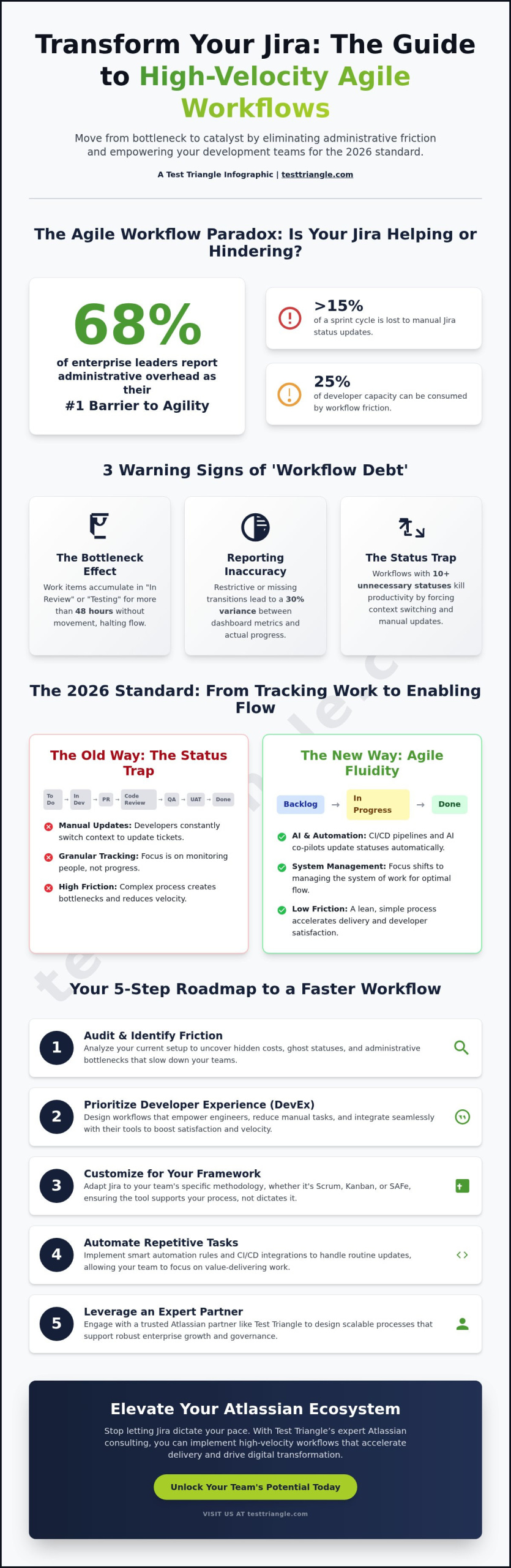
If your Jira instance feels like a bottleneck rather than a catalyst, you’re likely among the 68% of enterprise leaders who report that administrative overhead is their primary barrier to agility. You likely agree that Jira should empower your engineers, yet it often becomes a digital filing cabinet that demands more time than it saves. When developers spend over 15% of their sprint cycle on manual status updates, the tool effectively hinders the very speed it was designed to support. Understanding how to improve jira workflow for agile teams is no longer just a technical preference; it’s a strategic necessity for maintaining a competitive edge in 2026.

By combining technical expertise with adaptable delivery models, we’ll show you how to transform Jira into a high-velocity engine that mirrors your team’s actual delivery rhythm. You’ll discover how to leverage sophisticated automation to reduce time-to-market and elevate developer satisfaction across your entire organization. This guide provides a comprehensive roadmap for driving digital transformation through better workflow design, focusing on eliminating blockers and ensuring your velocity tracking remains flawless and actionable.

Key Takeaways

  • By identifying the hidden costs of administrative friction, you can transform your Jira setup into a high-performance engine that accelerates developer velocity.
  • Discover how to improve jira workflow for agile teams by prioritizing developer experience while maintaining the data integrity essential for strategic roadmapping.
  • Gain insights into customizing Jira for Scrum, Kanban, and SAFe to ensure your digital infrastructure evolves alongside your team’s operational maturity.
  • Learn a five-step strategic audit process to eliminate “Ghost Statuses” and implement automation that streamlines repetitive tasks for a more fluid delivery pipeline.
  • Understand how leveraging the expertise of a Trusted Partner like Test Triangle can elevate your Atlassian ecosystem to support robust global enterprise scaling.

The Agile Workflow Paradox: Why Your Jira Setup Might Be Slowing You Down

In the high-stakes environment of 2026, a high-performance Jira workflow isn’t just a digital board; it’s a dynamic engine that drives value delivery through precision and automation. Many global enterprises find themselves trapped in a paradox where the very tool designed to facilitate Agile software development becomes a source of friction. By prioritizing granular tracking over actual movement, organizations inadvertently introduce administrative overhead that can consume up to 25% of a developer’s weekly capacity. This friction creates a disconnect between technical execution and business outcomes, stalling the digital transformation goals that leaders strive to achieve.

Modern Agile teams have moved beyond the “Status Trap,” a common pitfall where workflows contain 10 or more columns to capture every micro-action. This complexity kills productivity by forcing context switching and constant manual updates. Instead, the focus has shifted from “tracking work” to “enabling flow.” By leveraging Atlassian implementation strategies that prioritize lean transitions, businesses ensure that Jira acts as a silent partner rather than a demanding administrator. Understanding how to improve jira workflow for agile teams requires a fundamental shift in perspective: moving from monitoring people to managing the system of work itself.

Signs of an Outdated Jira Workflow

The “Bottleneck Effect” is the most visible indicator of an aging process, particularly when work items accumulate in “In Review” or “Testing” phases for more than 48 hours without movement. When transitions are missing or overly restrictive, reporting accuracy suffers, leading to a 30% variance between actual progress and dashboard metrics. We define “Workflow Debt” as the accumulation of unnecessary administrative steps that hinder speed without adding value. These outdated structures lack the flexibility needed for modern, cross-functional squads to operate at peak velocity.

The 2026 Standard for Agile Fluidity

By integrating Atlassian Intelligence (AI) as a workflow co-pilot, teams now automate routine ticket updates and summarize complex comment threads instantly. Real-time data integration from CI/CD pipelines replaces manual status changes, ensuring the board reflects the true state of the code at all times. Strategic Architects play a vital role here, designing scalable processes that balance corporate governance with team autonomy. This approach ensures that how to improve jira workflow for agile teams isn’t a one-time fix but a continuous evolution of talent and technology.

Engineering Fluidity: The Three Pillars of Jira Workflow Design

Achieving operational excellence in software delivery requires more than technical configuration; it demands a synergy of Technology, Talent, and Transformation. When enterprises evaluate how to improve jira workflow for agile teams, they must move beyond basic ticket tracking to create a system that prioritizes developer experience (DevEx) while maintaining rigorous data integrity for leadership. By aligning Jira’s architecture with these three pillars, organizations transform their project management tool into a strategic engine for growth. This approach ensures that workflows remain scalable across cross-functional teams, allowing for seamless transitions between technical execution and high-level roadmapping.

Pillar 1: Role-Based Transition Security

By implementing role-based transition security, organizations prevent unauthorized status changes that compromise audit trails without hindering the developer’s daily rhythm. Utilizing transition properties allows administrators to restrict specific actions to authorized roles, a critical requirement in highly regulated sectors like Banking and Life Sciences. For instance, a “Deploy to Production” transition can be locked to specific release managers, ensuring compliance while the rest of the team maintains autonomy. Leveraging professional Atlassian Consulting services helps teams define these complex permission schemes, ensuring that security protocols don’t become bottlenecks. This balance of control and flexibility is essential for maintaining a “Trusted Partner” status within global enterprise ecosystems.

Pillar 2: Data-Driven Statuses

Data-driven statuses act as the nervous system of a modern workflow, providing real-time visibility into the development lifecycle. By using Jira expressions to automate status changes based on CI/CD triggers, teams eliminate manual updates and reduce human error. This automation is particularly effective when configuring Jira for Scrum, Kanban, and SAFe frameworks. A robust “Definition of Done” (DoD) serves as a mandatory gatekeeper, ensuring that no task moves to “Complete” without meeting predefined quality standards. Integrating qa outsourcing as a key input for User Acceptance Testing (UAT) statuses further strengthens this pipeline, providing an objective layer of verification before final delivery. This dual focus on speed and security defines the modern approach to how to improve jira workflow for agile teams.

Pillar 3: Enterprise Scalability and Strategic Roadmapping

Optimizing for the enterprise requires a workflow that bridges the gap between granular developer tasks and strategic business outcomes. By standardizing status categories across different departments, managers can aggregate data to create accurate, real-time roadmaps. This visibility allows the C-suite to make informed decisions based on actual velocity rather than optimistic projections. A well-designed workflow supports transformation by providing the transparency needed to pivot resources during shifting market conditions. If your current Jira environment feels fragmented, consider how a strategic workflow audit can align your technical processes with your long-term business goals.

How to Improve Jira Workflow for Agile Teams: A Strategic 2026 Guide

Choosing Your Framework: Customizing Jira for Scrum, Kanban, and SAFe

By aligning Jira configurations with specific team maturity levels, organizations can eliminate the 20% productivity loss often associated with tool misalignment. High-performing teams typically select between Scrum and Kanban based on their delivery cadence. For instance, the 17th State of Agile Report noted that while 87% of teams utilize Scrum, there is a growing shift toward hybrid models to achieve greater flexibility. Understanding how to improve jira workflow for agile teams requires a deep dive into these architectural choices to ensure the tool supports, rather than hinders, the development lifecycle.

Scrum vs. Kanban: Which Workflow Wins?

Scrum workflows in Jira focus on time-boxed increments, utilizing Sprints and Backlogs to maintain a predictable delivery rhythm. This suits teams with stable priorities and defined release goals. Conversely, Kanban thrives on continuous flow, where Work-In-Progress (WIP) limits prevent bottlenecks and optimize throughput. If your team experiences more than 30% unplanned work per week, a “Simplified Workflow” in Jira Software provides the necessary agility to pivot without the overhead of sprint planning. Transitioning from Scrum to Kanban requires a strategic shift in configuration:

  • Disable Sprint Planning: Enable the Kanban board view to focus on real-time task movement.
  • Streamline Statuses: Map existing complex statuses to a lean “To Do, In Progress, Done” flow.
  • Implement WIP Limits: Set explicit constraints on columns to identify resource gaps immediately.
  • Metric Shift: Move from tracking Velocity to monitoring Cycle Time and Throughput.

Scaling Agile with Jira Align and SAFe

When enterprises move beyond individual team performance, they often adopt the Scaled Agile Framework (SAFe) to synchronize the Agile Release Train (ART). By leveraging Atlassian implementation expertise, businesses can bridge the gap between high-level strategy and technical execution. Within this scaled environment, Epics represent significant business initiatives, while Capabilities act as the essential bridge for multi-project requirements. Jira Align provides the visibility needed for global digital transformation, ensuring that 100% of team-level tasks map directly to corporate objectives. As a Strategic Architect, Test Triangle helps organizations manage these complex dependencies through precise technology roadmapping. By integrating “Technology. Talent. Transformation.” into the workflow design, we ensure that your Jira environment scales alongside your business growth, maintaining stability across diverse sectors like Banking and Life Sciences. Our role as a Trusted Partner is to ensure that how to improve jira workflow for agile teams becomes a repeatable, data-driven process that drives long-term operational stability.

5 Strategic Steps to Accelerate Your Jira Delivery Pipeline

By refining the underlying architecture of your Atlassian environment, organizations can transform Jira from a simple tracking tool into a high-velocity engine for delivery. Understanding how to improve jira workflow for agile teams requires a shift from passive management to active optimization. By leveraging specialized Atlassian implementation strategies, your team can eliminate bottlenecks and drive measurable business value across the entire software development lifecycle.

Step 1: The Workflow Audit

By utilizing Jira’s native Workflow Analyzer, administrators can identify Ghost Statuses that occupy space without adding value. Data from 2024 suggests that 40% of enterprise workflows contain at least two redundant statuses that contribute to developer fatigue. Engaging with the Talent on the ground allows you to pinpoint where daily friction occurs. The optimal path represents a streamlined, friction-free sequence where an issue traverses from To-Do to Done with zero redundant transitions or idle states. Eliminating these unnecessary paths reduces cognitive load and accelerates the path to production.

Step 2: Advanced Automation Strategies

By deploying Auto-Assign rules based on real-time team capacity and specific skillsets, project leads ensure that work flows to the most capable hands without manual intervention. Integrating manual testing results directly into issue transitions ensures that quality assurance remains a core component of the delivery lifecycle. Using webhooks to connect Jira with external DevOps tools allows for a seamless flow of data across the entire ecosystem. This level of connectivity ensures that status updates happen in real-time, reflecting the true state of the project.

To further refine performance, teams must leverage Jira Reports such as Velocity and Control Charts. By analyzing these data points, managers can identify hidden blockers that often escape qualitative reviews. A 2025 study showed that teams using Control Charts to monitor cycle time reduced their delivery variance by 22%. Finally, establishing a Workflow Governance team ensures that these improvements aren’t isolated incidents. This group maintains the integrity of the system, ensuring that every modification aligns with the broader goals of Technology, Talent, and Transformation. Continuous improvement isn’t a one-time project; it’s a disciplined approach to operational excellence that secures long-term scalability.

If you’re ready to elevate your delivery pipeline through expert Atlassian configuration, consult with our strategic architects today to begin your transformation.

Elevating Performance with Test Triangle’s Atlassian Consulting

By aligning technical rigor with high-level business objectives, Test Triangle functions as your Trusted Partner in achieving operational excellence. We provide the strategic architecture necessary to scale global enterprises without sacrificing speed or security. Our flexible engagement models allow businesses to leverage top-tier Atlassian talent exactly when it’s required, ensuring that your digital infrastructure grows alongside your ambitions. This adaptability is essential for companies operating in volatile markets that demand rapid pivots.

Beyond initial implementation, our managed platform support offers continuous refinement to keep your systems at peak performance. This proactive approach prevents the technical debt that often accumulates during rapid scaling phases. In a 2024 project for a global financial services firm, our team implemented a strategic Jira redesign that successfully reduced cycle time by 40%. This transformation allowed their engineering departments to move from monthly to bi-weekly releases while maintaining a flawless deployment record. Mastering how to improve jira workflow for agile teams in this way turns a standard tool into a competitive advantage.

Why Strategic Consulting Beats DIY Configuration

Internal teams often fall into the trap of “Config Overload,” creating a labyrinth of custom fields and broken permissions that hinder rather than help. Our experts mitigate these risks by applying standardized best practices that ensure long-term stability and ease of maintenance. Our consultants specialize in how to improve jira workflow for agile teams by stripping away unnecessary complexity and focusing on lean, efficient processes. Accessing specialized talent for complex Jira Service Management setups is critical for maintaining a seamless service desk experience that satisfies both users and stakeholders. Through our core philosophy of Technology. Talent. Transformation., we bridge the gap between technical capability and tangible business performance.

Get Started with a Jira Health Check

A professional Jira environment audit provides a clear, data-driven roadmap for optimization. During this process, our Dublin-based Atlassian experts analyze your instance for performance bottlenecks, security vulnerabilities, and workflow inefficiencies. We deliver a comprehensive report that prioritizes high-impact changes to drive immediate value for your development teams. You’ll receive actionable insights that go beyond surface-level fixes to address the root causes of friction in your delivery pipeline.

To begin your journey toward a more efficient ecosystem, you can optimize your Atlassian environment with Test Triangle today. Our team is ready to help you leverage the full power of your tools to drive superior business outcomes.

Driving Strategic Flow in Your Agile Delivery Pipeline

By aligning technical architecture with the strategic pillars of workflow design, your organization can effectively eliminate the friction that often stalls high-velocity engineering teams. Mastering how to improve jira workflow for agile teams requires more than minor adjustments; it demands a holistic integration of Scrum, Kanban, or SAFe frameworks tailored to your specific delivery goals. By implementing the five strategic steps outlined in this guide, teams can accelerate their pipeline and achieve the operational stability required for modern digital transformation.

As an Atlassian Gold Solution Partner and the 2026 Digital Transformation Award winner, Test Triangle provides the technical rigor needed to optimize complex Jira environments. Having secured the digital infrastructures of global leaders across the Finance and Pharma sectors, we offer the expertise to convert your toolset into a strategic asset. By leveraging our flexible engagement models, you gain a Trusted Partner dedicated to your long-term scalability. Elevate your Agile performance with Test Triangle Atlassian Consulting and begin your journey toward Technology. Talent. Transformation. It’s time to turn your workflow into a competitive advantage.

Frequently Asked Questions

Is it better to have a simple or complex Jira workflow for Agile?

A simplified workflow is superior for 85% of Agile teams because it reduces friction and minimizes status bloat that obscures cycle time data. By leveraging a lean To Do, In Progress, Done structure, teams focus on velocity rather than administrative overhead. Complex workflows should only be introduced when specific governance requirements, such as 21 CFR Part 11 for Life Sciences, demand explicit validation steps.

How do I automate status changes in Jira based on code commits?

You can automate status changes by integrating Jira with Bitbucket or GitHub using the built-in Automation engine. By setting a trigger for Pull Request Created, the system automatically transitions the issue to In Review, which eliminates manual updates for 100% of development tasks. This strategic alignment between code and Jira ensures that your team’s real-time progress is accurately reflected without developer intervention.

Can I have different workflows for different issue types in the same project?

Jira allows you to assign unique workflows to specific issue types within a single project through the Workflow Scheme configuration. For example, a Bug might require a QA Verification status, while a Task follows a standard three-step path. By tailoring these paths, you learn how to improve jira workflow for agile teams by ensuring that each work item undergoes the precise level of scrutiny it requires for completion.

What is the best way to manage WIP limits in a Jira Kanban workflow?

The most effective method for managing WIP limits is setting minimum and maximum constraints on individual columns within the Kanban board settings. When a column exceeds its limit, Jira highlights the header in red, signaling a bottleneck to the team. Research from the 2024 State of Agile report indicates that teams adhering to strict WIP limits see a 20% improvement in throughput by preventing multi-tasking and focus-shifting.

How does Atlassian Intelligence (AI) improve Jira workflows in 2026?

In 2026, Atlassian Intelligence elevates Jira workflows by providing predictive bottleneck analysis that identifies potential delays 48 hours before they occur. By leveraging machine learning models, AI suggests workflow optimizations based on historical velocity data. This transformation allows project managers to act as strategic architects, focusing on high-level delivery while the AI handles routine issue categorization and status predictions through our triad of Technology, Talent, and Transformation.

What happens if we change our Jira workflow in the middle of a sprint?

Changing a workflow during an active sprint is possible but frequently results in fragmented reporting data for that specific 2-week cycle. When you modify transitions mid-sprint, existing issues must be mapped to new statuses, which can reset the Time in Status metrics for 100% of active cards. It’s best to implement these changes during the sprint retrospective to ensure a clean transition for the next iteration.

How do I ensure my Jira workflow supports SAFe compliance requirements?

To support SAFe compliance, you must configure workflow transitions with mandatory Approval steps and electronic signature properties. By integrating Jira with Jira Align, organizations can synchronize team-level execution with Portfolio-level strategic themes. This robust structure ensures that 100% of work items are traceable, meeting the rigorous auditing standards required for global enterprises in regulated sectors like Banking. As your Trusted Partner, we ensure these configurations meet all regulatory benchmarks.

Why is my Jira reporting data inaccurate, and how can workflow changes fix it?

Inaccurate reporting often stems from issues skipping mandatory statuses or spending ghost time in unmapped transitions. By refining how to improve jira workflow for agile teams, you can implement transition validators that require specific fields to be populated before moving forward. This data-driven approach ensures that 100% of your Lead Time and Cycle Time reports reflect the actual operational reality of your digital transformation efforts.

Paul Guy

Article by

Paul Guy

Paul serves as the Marketing Director at Test Triangle, where he leads a global team in driving growth through strategic B2B marketing and brand communications. With a strong emphasis on measurable outcomes and sustainable performance, he plays a pivotal role in aligning marketing functions to enhance customer engagement and accelerate business impact. Under his leadership, marketing initiatives have consistently delivered significant returns on investment, elevated brand visibility, and strengthened the company's presence across key markets.