
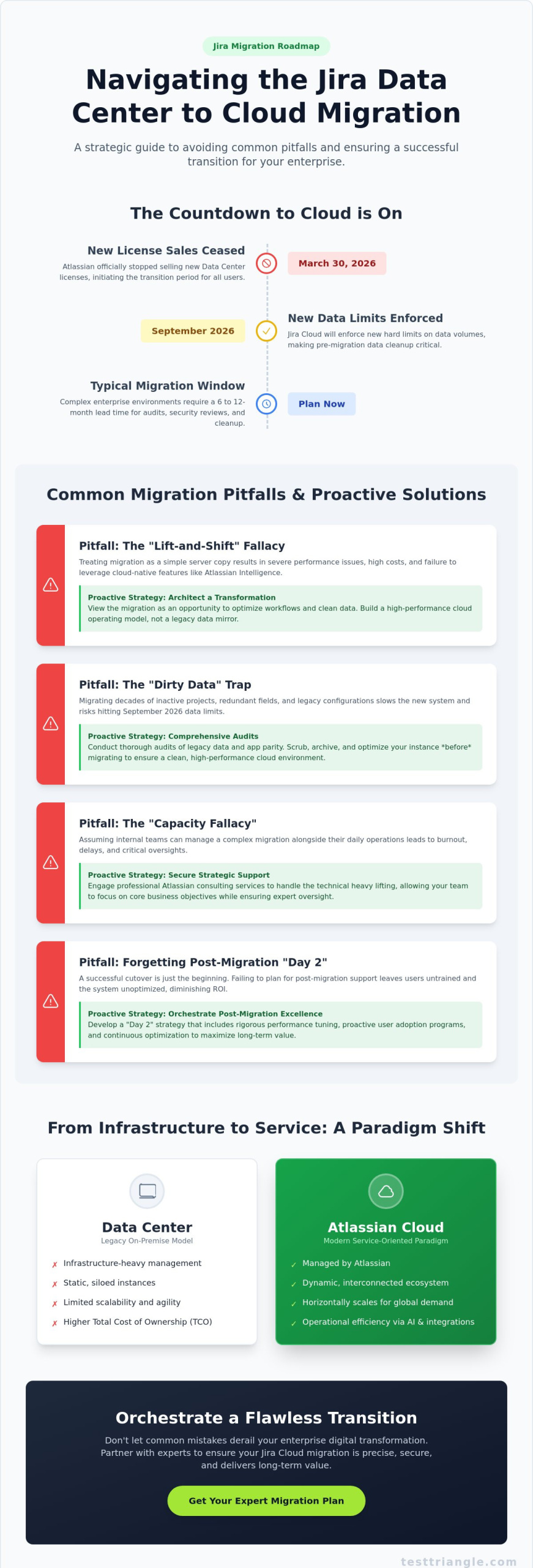
Did you know that as of March 30, 2026, Atlassian has officially ceased the sale of new Data Center licenses, effectively placing a firm countdown on your legacy infrastructure? It’s a reality that many global organizations find daunting, especially when faced with the intricate challenge of moving high-volume instances. You likely recognize that the complexity of migrating third-party apps and the risk of business downtime during cutover are not just technical hurdles; they’re significant threats to your operational continuity. By identifying common jira data center to cloud migration mistakes early, your team can pivot from a reactive posture to a proactive strategy that ensures precision, pace, and performance.

This guide identifies the critical pitfalls that derail enterprise transitions and provides a clear risk-mitigation roadmap for the current regulatory environment. We’ll examine the nuances of Atlassian Cloud features, the impact of the September 2026 data limits, and the strategic business case for professional Atlassian consulting to ensure your long-term success. Whether you’re navigating the requirements of the NIS2 Directive or managing a hybrid-sovereign cloud model, understanding these nuances is essential for a secure and high-performance transition.

Key Takeaways

  • Architect a strategic transition by moving beyond the simple “lift-and-shift” mentality to ensure your cloud environment functions as a high-performance operating model rather than a legacy data mirror.
  • Mitigate technical risks by conducting comprehensive audits of legacy data and app parity, effectively neutralizing common jira data center to cloud migration mistakes before they impact your production environment.
  • Navigate the evolving landscape of global data sovereignty and residency regulations to maintain strict compliance with modern frameworks like the NIS2 Directive and the EU Data Act.
  • Secure organizational stability by addressing the “capacity fallacy,” ensuring that internal teams have the necessary strategic support to manage both daily operations and the technical nuances of Atlassian Cloud.
  • Orchestrate a successful “Day 2” strategy that prioritizes rigorous performance tuning and proactive user adoption to maximize the long-term value of your enterprise digital transformation.

Beyond the Lift-and-Shift: The Strategic Landscape of Jira Cloud Migration in 2026

Transitioning from Jira Data Center to the Cloud is no longer a mere technical upgrade; it’s a fundamental transformation of your organizational operating model. In 2026, the distinction between maintaining a legacy environment and evolving into a cloud-native enterprise is defined by how effectively leadership views the platform as a driver of velocity. Treating this transition as a simple “lift-and-shift” operation is one of the most common jira data center to cloud migration mistakes, often resulting in severe post-migration performance issues. This outdated mentality fails to account for the architectural differences between clustered on-premise servers and the multi-tenant, service-oriented nature of the Atlassian Cloud.

Success in the current landscape requires a shift in focus from the immediate cost of migration to the long-term Total Cost of Ownership (TCO). While the initial project expenses are visible, the true value lies in the operational efficiency gained through Atlassian Intelligence and Rovo integrations. These AI-driven tools, which transform whiteboard sessions into actionable Jira items and automate status updates, require clean, structured data to function. Migrating “dirty data” or redundant workflows prevents these sophisticated systems from delivering the insights they’re designed to provide. Consequently, a strategic approach prioritizes data hygiene and workflow optimization long before the first record is moved.

The Evolution from Data Center to Cloud Architecture

The transition from Data Center to Cloud represents a move from infrastructure-heavy management to a service-oriented paradigm where Atlassian manages the underlying complexities. When understanding the fundamentals of cloud migration, it’s clear that the shift involves a total re-evaluation of how data is processed and stored globally. Atlassian Cloud utilizes a distributed architecture that scales horizontally, ensuring that performance remains consistent regardless of user volume. Cloud-Native Jira is a dynamic ecosystem of interconnected services that scale horizontally to meet global demand, rather than a static, siloed instance. This architecture allows for a level of agility and security that traditional Data Center models simply cannot replicate in a fast-paced market.

Why Planning Delays are Fatal for Enterprise Timelines

A frequent error that compromises enterprise stability is waiting too long to initiate the migration process. With the March 30, 2026 deadline for new Data Center license sales already passed, the countdown to the 2029 end-of-life is accelerating. Complex enterprise environments typically require a 6 to 12-month lead time to navigate app parity audits, security reviews, and data cleanup. Underestimating this timeline is another of the common jira data center to cloud migration mistakes that leads to rushed cutovers and avoidable downtime. Partnering with professional Atlassian Consulting Services provides the strategic oversight needed to manage these nuances, allowing your internal teams to maintain focus on core business objectives while experts handle the technical heavy lifting.

The Technical Pitfalls: Data Integrity, App Parity, and Identity Management

Technical execution often falters when organizations prioritize speed over data hygiene. Migrating decades of legacy configurations, inactive projects, and redundant custom fields creates the “Dirty Data” trap. This clutter doesn’t just slow down the system; it actively compromises the user experience and can trigger the new hard limits on data volumes that Jira Cloud will enforce starting in September 2026. Failing to scrub your instance before deployment is one of the most common jira data center to cloud migration mistakes, leading to a platform that feels bloated and unresponsive from day one.

App parity remains a significant point of friction. Many stakeholders assume that a “Cloud-compatible” version of a Data Center app provides identical functionality, but the reality is often a reduced feature set or a completely different workflow. This functional gap requires a disciplined evaluation of your app ecosystem to ensure business processes remain intact. Without rigorous sandbox testing, these discrepancies only surface post-cutover, causing immediate productivity losses and technical debt. To ensure your technical roadmap is sound, you might consider consulting with a technical strategist before finalizing your cutover plan.

Executing a Comprehensive App and Data Audit

A robust audit framework categorizes every third-party integration into three paths: Retire, Replace, or Reinstall. Retiring obsolete apps reduces licensing costs and security risks, while replacing others with cloud-native alternatives ensures long-term stability. Before utilizing the Jira Cloud Migration Assistant (JCMA), teams must perform meticulous data mapping for complex custom fields. This step ensures that critical metadata survives the transition and aligns with the Cloud’s specific data structures, preventing the loss of historical context during the transfer.

Identity and Access Management (IAM) Strategy

The shift from local LDAP or Active Directory to Atlassian Guard represents a major architectural change. Ignoring User Provisioning (SCIM) during the planning phase often results in fragmented user directories and failed Single Sign-On (SSO) attempts. Validating these permissions is vital; leveraging Software Test Automation Services allows organizations to verify that complex access hierarchies remain secure and functional across the entire enterprise. This automated validation provides the qualitative assurance needed for high-stakes environments.

Relying on a single test migration is a high-risk oversight for enterprise-scale data. Effective migrations utilize multiple sandbox environments to refine the process, identifying edge cases that only appear under heavy load or complex data interdependencies. This iterative methodology transforms a volatile technical transfer into a controlled, predictable evolution that supports long-term operational stability.
Common Jira Data Center to Cloud Migration Mistakes: A Strategic Guide for 2026

Compliance and Security Oversights: Navigating Global Data Sovereignty

A frequent misunderstanding in the migration journey is the assumption that Atlassian’s shared responsibility model provides an all-encompassing shield against local regulatory infractions. While Atlassian maintains robust platform security, the onus of data governance, residency compliance, and configuration integrity remains firmly with the enterprise. Overlooking this distinction is one of the most common jira data center to cloud migration mistakes, potentially exposing organizations to the severe penalties associated with the NIS2 Directive and the EU Data Act. In an era where cumulative GDPR fines reached €7.1 billion by early 2026, assuming “Cloud-native” equals “automatically compliant” is a risk no global leader should take.

Highly regulated sectors face even more granular challenges that require a strategic, practical approach. Pharmaceutical organizations must navigate GxP validation requirements to ensure their Jira Cloud environments remain compliant with electronic record standards. Similarly, financial institutions are often bound by the “Right to Audit” and strict encryption protocols for data at rest and in motion. Failing to account for these sector-specific mandates during the architectural phase leads to costly retrofitting or total project halts during external audits. Precision in planning is the only antidote to such high-stakes regulatory friction.

Data Sovereignty in a Post-GDPR Landscape

Jira Cloud Enterprise offers sophisticated data residency features that allow organizations to pin their data to specific geographic regions. However, selecting the wrong region for a global team can inadvertently trigger jurisdictional conflicts or latency issues. Many enterprises fail to align their data storage locations with the specific requirements of the over 140 countries that now have active data protection laws. To navigate these complexities, engaging with a Managed Service Provider ensures your cloud architecture is strategically aligned with both global performance needs and local legal mandates.

Security Configuration vs. Platform Security

There’s a critical difference between the security of the Atlassian platform and the security of how you configure your specific instance. Bulk migrations often result in the preservation of “over-privileged users,” where permissions that were safe in a siloed Data Center environment become vulnerabilities in the Cloud. This oversight can lead to unauthorized data exposure or non-compliance with internal security policies. A Zero-Trust approach to Cloud Jira access is not merely a preference; it’s a fundamental requirement for modern enterprise stability. By implementing strict identity verification and least-privilege access, organizations can mitigate the risks inherent in large-scale technological evolution while maintaining operational agility.

The Human Element: Why Change Management and Resource Underestimation Fail

Organizations often succumb to the “Capacity Fallacy,” assuming that their internal Jira administrators can maintain business-as-usual operations while simultaneously architecting a complex migration. This resource underestimation is among the most common jira data center to cloud migration mistakes; it leads to burnout, overlooked technical requirements, and eventually, a compromised transition. When internal teams are stretched thin, the meticulous attention required for data mapping and security configuration inevitably wavers, creating systemic vulnerabilities that manifest long after the cutover is complete. True operational stability requires a recognition that migration is a dedicated project, not a side task for an already burdened IT department.

Beyond the technical staffing, the human element of user adoption often becomes a primary point of failure. Ignoring the UI/UX changes between Data Center and Cloud results in immediate productivity loss as users struggle with a redesigned interface and new navigation patterns. This “Migration Anxiety” is exacerbated by a communication void where stakeholders feel uninformed about how their daily workflows will evolve. Training gaps are equally damaging, particularly when power users aren’t educated on Cloud-only features like advanced Automation or Rovo. Without a structured approach to change management, even the most technically perfect migration can be perceived as a failure by the workforce it was intended to empower.

Bridging the Internal Expertise Gap

Augmenting your core team with specialized IT Staffing Services provides the necessary bandwidth to manage complex migrations without disrupting daily output. An experienced Atlassian Solution Architect plays a pivotal role in this process, ensuring that the new Cloud environment is built to avoid architectural debt and long-term performance bottlenecks. When evaluating the investment, leaders must compare the cost of external consulting against the catastrophic financial impact of a failed 48-hour cutover. Precision in staffing is a prerequisite for a seamless, low-risk transition that protects your enterprise’s operational integrity.

A Strategic Communication and Training Roadmap

Mitigating common jira data center to cloud migration mistakes requires a structured, 4-phase communication plan: Announcement, Education, Preparation, and Support. Identifying “Champion” users within each department allows for peer-to-peer leadership, which often proves more effective than top-down directives. These advocates help bridge the gap between technical changes and practical application. Furthermore, a human-centric approach to quality is essential; referring to a Manual Testing Guide can help your team understand how to validate the user experience through the eyes of the end-user rather than just through automated scripts. This comprehensive preparation ensures that when the system goes live, your workforce is ready to leverage the new platform’s full potential.

To ensure your internal teams are supported by the right expertise during this critical evolution, speak with an enterprise migration strategist to secure your resource roadmap.

Orchestrating a Flawless Transition: A Framework for Post-Migration Excellence

The successful execution of a technical cutover isn’t the finish line; it’s the commencement of your platform’s most vulnerable phase. One of the most common jira data center to cloud migration mistakes is the “Day 2” oversight, where organizations prematurely disband their project teams once the data appears to be live. This strategic withdrawal often leads to unresolved latency issues, broken integration hooks, and a frustrated user base that lacks immediate support. Realizing the full value of your investment requires a shift from a “Migrated” status to an “Optimized” state, ensuring the system meets the rigorous speed and reliability standards expected in 2026.

True post-migration excellence is defined by how effectively you leverage the cloud-native features that weren’t available in your legacy environment. In the current landscape, this means integrating Atlassian Intelligence and Rovo to drive automated status updates and intelligent search capabilities across your entire digital ecosystem. Without proactive performance tuning and the removal of technical debt that survived the move, these sophisticated tools won’t reach their full potential. A disciplined approach to refinement ensures that your transition results in a high-performance, future-ready infrastructure rather than a mere mirror of your old on-premise limitations.

Post-Migration Hypercare and Optimization

A structured “Hypercare” period, typically spanning the first 30 days post-migration, is essential for maintaining operational cadence. During this window, dedicated support resources must be available to address edge cases that only emerge under the pressure of full-scale production. Conducting a post-migration audit is vital to identify “Ghost Data” or broken links that can occur when complex project interdependencies are moved between architectures. For organizations looking to transform this initial stability into a long-term competitive advantage, engaging with DevOps Consulting Services provides a roadmap for continuous platform evolution and systemic improvement.

Establishing a Cloud Governance Framework

Failing to update governance policies for the cloud environment often leads to “admin sprawl,” where a lack of centralized control results in redundant configurations and security vulnerabilities. Strategic management of Atlassian Marketplace app subscriptions is equally critical; organizations must monitor renewals and usage patterns to prevent licensing costs from escalating unchecked. By establishing a robust governance framework, you ensure that your Jira Cloud instance remains secure, scalable, and cost-effective. To navigate these complexities with confidence and secure your organizational progress, Partner with Test Triangle for a Risk-Free Atlassian Migration and experience the peace of mind that comes from expert-led digital transformation.

Strategizing Your Evolution to Atlassian Cloud

Successfully navigating the transition to Atlassian Cloud requires a fundamental shift in perspective, moving from a narrow focus on technical file transfers to a comprehensive strategy for organizational evolution. By proactively addressing common jira data center to cloud migration mistakes, your enterprise can effectively bypass the technical debt and compliance risks that frequently stall global digital transformations. This journey demands a disciplined approach to data hygiene, a robust governance framework, and a dedicated focus on user adoption that empowers your workforce to leverage the full potential of Atlassian Intelligence. You don’t have to manage this intricate process in isolation; the right partnership transforms a volatile project into a predictable success story.

As an Atlassian Gold Solution Partner, we provide the specialized expertise in Pharma and Finance compliance required to ensure your transition meets the most rigorous global regulatory standards. Our global delivery model offers the strategic oversight and technical precision necessary to maintain operational stability during high-stakes cutovers. Secure Your Seamless Atlassian Cloud Migration with Test Triangle and begin your journey toward a high-performance, future-ready infrastructure. Your path to a secure and scalable cloud environment starts here.

Frequently Asked Questions

What is the most common mistake in Jira Data Center to Cloud migrations?

Underestimating the architectural shift by treating the project as a simple “lift-and-shift” is the most frequent error global organizations make. This reactive approach leads to common jira data center to cloud migration mistakes such as severe performance bottlenecks and broken automation hooks. Successful transitions require a strategic overhaul of data hygiene and app parity long before the final production cutover begins.

How long does a typical enterprise Jira Cloud migration take in 2026?

Enterprise-scale migrations typically require a lead time of 6 to 12 months to navigate the complexities of global data residency and rigorous security audits. This timeline allows for meticulous planning, data scrubbing, and multiple sandbox testing phases to identify edge cases. Rushing this window often compromises the integrity of the final environment and leads to avoidable business downtime.

Can we migrate all our Jira Data Center apps to the Cloud?

Not every Data Center app has a direct Cloud equivalent with identical functionality; some require complete replacement or retirement. You must categorize your app ecosystem into those to retire, replace, or reinstall based on their specific Cloud-native capabilities. A disciplined audit prevents functional gaps that disrupt critical business processes after the transition is complete.

Is Jira Cloud as secure as Jira Data Center for regulated industries?

Jira Cloud provides robust security through Atlassian Guard, but organizations must actively manage their specific configurations to meet local regulatory mandates. This shared responsibility model ensures that while the platform is secure, the client remains accountable for data governance and user access hierarchies. Proper alignment with frameworks like the NIS2 Directive is essential for maintaining compliance in regulated sectors.

What happens if our Jira migration fails during the cutover weekend?

A failed cutover requires the immediate execution of a pre-verified rollback plan to restore services on the original Data Center instance. To avoid this scenario, teams should conduct exhaustive performance testing and sandbox rehearsals to identify technical friction points before the live migration. Minimizing downtime depends on a disciplined methodology and the foresight to have experts on standby.

How do we handle user training for the new Jira Cloud interface?

User training should follow a structured roadmap that includes early announcements and the identification of department-level “champion” advocates. These champions help bridge the gap between technical UI changes and practical daily application for their peers through peer-to-peer support. Focusing on the human element ensures that the workforce remains productive and engaged during the technological evolution.

Do we need an external Atlassian consultant for the migration?

Engaging an external Atlassian consultant is a strategic decision that provides the specialized expertise needed to avoid common jira data center to cloud migration mistakes. Professional consultants bring a global delivery model and deep technical knowledge that internal teams, often occupied with daily operations, may lack. This partnership significantly reduces project risk and ensures long-term operational stability.

What is the difference between Jira Cloud and Jira Data Center features in 2026?

By 2026, the primary differentiator is the integration of Atlassian Intelligence and Rovo, which are features exclusive to the Cloud platform. These tools offer automated status updates and intelligent search capabilities that traditional Data Center environments cannot support. The Cloud architecture also scales horizontally, providing superior performance and agility for global teams compared to siloed server clusters.

Paul Guy

Article by

Paul Guy

Paul serves as the Marketing Director at Test Triangle, where he leads a global team in driving growth through strategic B2B marketing and brand communications. With a strong emphasis on measurable outcomes and sustainable performance, he plays a pivotal role in aligning marketing functions to enhance customer engagement and accelerate business impact. Under his leadership, marketing initiatives have consistently delivered significant returns on investment, elevated brand visibility, and strengthened the company's presence across key markets.

What if the very platform designed to accelerate your team’s digital transformation has become the primary anchor slowing down your operational velocity? Most enterprise leaders recognize that Jira is indispensable for scale, yet they find themselves buried under a mounting pile of manual provisioning requests and a configuration sprawl that threatens system stability. To effectively reduce jira administration overhead, organizations must shift their perspective from reactive maintenance to a sophisticated, standardized governance framework that prioritizes long-term platform health over short-term fixes.

You likely understand the frustration of managing an environment where custom fields have spiraled toward the 700-field limit or where manual user de-provisioning consumes hours of your team’s week. We promise that by implementing the strategies outlined in this guide, you’ll reclaim administrative time for high-level strategic initiatives and build a self-sustaining ecosystem. We’ll examine the methodology behind field optimization, the automation of routine workflows, and the critical steps needed to align your environment with Atlassian’s evolving cloud-first roadmap and the 2029 Data Center end-of-life milestones.

Key Takeaways

  • Identify architectural inefficiencies within your platform by moving beyond reactive ticket management toward a standardized global scheme that addresses the majority of team requirements.
  • Discover how to reduce jira administration overhead by leveraging native automation tools and Identity Provider integrations to eliminate manual user provisioning.
  • Empower internal teams through a disciplined delegated administration model that allows project leads to manage local versions and components without compromising system integrity.
  • Evaluate the strategic advantages of offloading operational complexity to specialized Atlassian Consulting partners to ensure long-term stability and platform performance.
  • Optimize system responsiveness and security by auditing redundant permission schemes and consolidating configuration sprawl into a scalable governance framework.

Diagnosing the Root Causes of Jira Administration Overhead

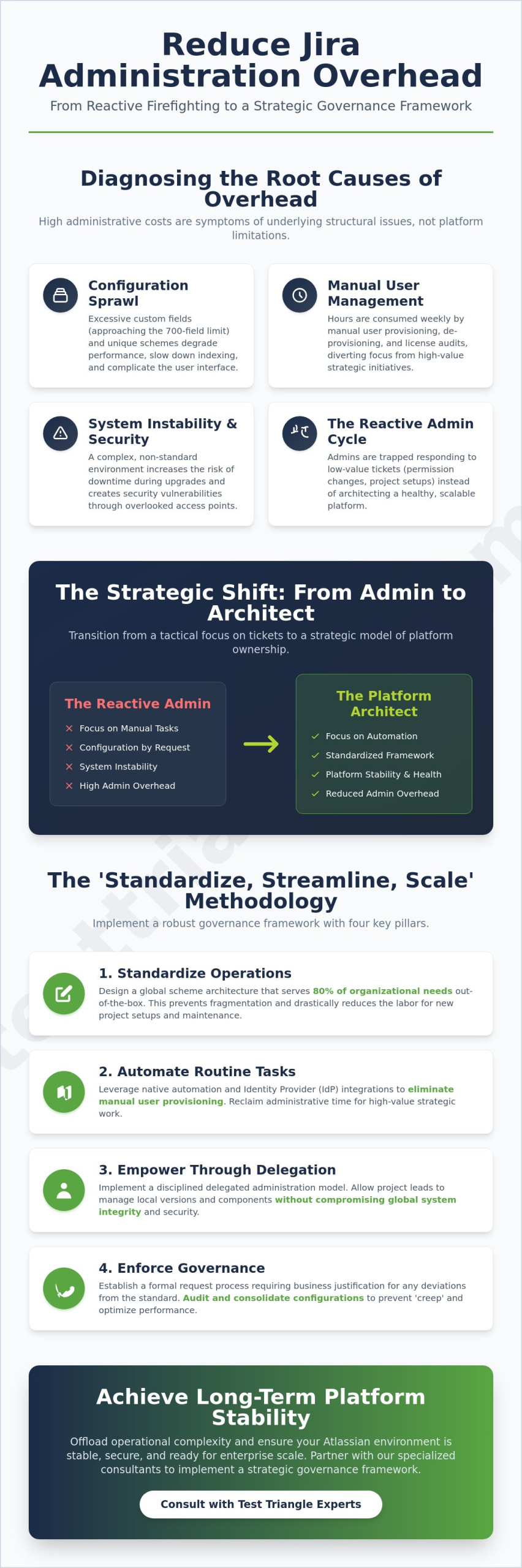
Organizations often view administrative burden as an inevitable byproduct of growth, yet this perspective ignores the underlying structural failures that compound over time. High administrative costs are rarely the result of platform limitations; rather, they’re symptoms of a fragmented Project governance framework that prioritizes individual team requests over global system health. To effectively reduce jira administration overhead, leadership must first acknowledge that most administrative labor is actually “rework” caused by a lack of standardization. When every project team is granted a unique set of custom fields and permission schemes, the resulting configuration sprawl creates a labyrinth that even seasoned admins struggle to navigate. This complexity doesn’t just frustrate users; it degrades system performance and increases the likelihood of security vulnerabilities through overlooked access points.

Beyond the technical debt of custom configurations, manual user management and license reconciliation represent a significant drain on internal resources. Research indicates that organizations automating user management can significantly lower licensing costs by identifying and deactivating inactive accounts. Without a strategic approach, IT teams remain trapped in a cycle of manual de-provisioning and license audits, diverting their expertise away from high-value Atlassian Consulting initiatives that could drive actual business transformation.

The Hidden Cost of Configuration Sprawl

The proliferation of custom fields acts as a silent tax on platform health. Atlassian recently noted that Jira Cloud can support up to 700 fields per space, but reaching these limits often leads to severe performance degradation. Excessive fields slow down issue indexing and complicate the user interface, making it harder for teams to find relevant information. A disciplined audit of field usage is essential to identify redundant or unused candidates for consolidation. Reducing this sprawl doesn’t just clean up the UI; it minimizes the risk of system downtime during upgrades or migrations, especially as organizations prepare for the 2029 Data Center end-of-life milestone.

Manual vs. Strategic Administration

Many IT departments operate in a “Reactive Admin” cycle, where the majority of their week is consumed by low-value support tickets for simple permission changes or project setups. This tactical focus creates a ceiling on team morale and prevents the transition toward a “Platform Architect” model. By quantifying the time lost to these routine tasks, leadership can justify the shift toward a self-service environment. True strategic administration involves designing a global scheme architecture that serves 80% of organizational needs without requiring manual intervention for every new request. This evolution empowers teams while ensuring the platform remains stable, secure, and ready for enterprise-scale growth.

Implementing a Robust Governance Framework to Standardize Operations

Transitioning from a reactive support model to a proactive governance framework requires more than just technical adjustments; it demands a cultural shift toward institutional discipline. To effectively reduce jira administration overhead, organizations must implement a ‘Standardize, Streamline, Scale’ methodology that treats project configuration as a shared corporate asset rather than a localized convenience. By designing a global scheme architecture that addresses 80% of team requirements through universal configurations, administrators can prevent the fragmentation that typically leads to performance bottlenecks. This strategic alignment ensures that every new project inherits a proven, secure foundation, significantly reducing the labor involved in manual setup and long-term maintenance.

A critical component of this evolution involves Implementing IT Governance to validate any requests for deviation from the standard. Establishing a formal request process that requires rigorous business justification for new custom fields or unique workflows prevents the ‘configuration creep’ identified in previous sections. For enterprises looking to accelerate this transition, our IT Service Management Services provide the structural expertise needed to align platform capabilities with business objectives. Documentation of these policies serves as the final pillar, ensuring that as the organization grows, the logic behind configuration decisions remains transparent and consistent.

Creating Shared Schemes for Scalability

Scalable governance relies on the deployment of universal permission and notification schemes that serve multiple projects simultaneously. By prioritizing Project Roles over individual user assignments, administrators can significantly reduce jira administration overhead by delegating day-to-day access management to project leads without granting global administrative rights. This approach simplifies the burden of security audits and ensures that standardized access patterns are applied consistently across the entire instance, protecting data integrity while fostering team autonomy.

The Role of a Jira Steering Committee

Maintaining a balance between team-level flexibility and enterprise-level stability requires the oversight of a Jira Steering Committee. This body, comprised of technical leads, business stakeholders, and compliance officers, approves major architectural changes and sets clear KPIs for administrative efficiency. By monitoring metrics such as field-to-project ratios and ticket resolution times, the committee ensures the platform remains agile. If your team is struggling to define these benchmarks, you might consider how a specialized assessment can help clarify your governance roadmap.

How to Reduce Jira Administration Overhead: A Strategic Guide to Scalable Governance

Automating Routine Tasks to Reclaim Administrative Time

While a robust governance framework establishes the necessary boundaries, automation serves as the engine that drives operational velocity. Relying on manual intervention for every status transition or field update is a recipe for administrative burnout and systemic delays. By leveraging native ‘Automation for Jira’ capabilities, organizations can reduce jira administration overhead through the creation of sophisticated rules that handle repetitive tasks without human oversight. This strategic shift allows your internal experts to focus on complex architectural challenges rather than the minutiae of daily maintenance, effectively transforming the IT department from a bottleneck into a facilitator of growth.

Beyond simple workflow triggers, the ability to execute bulk updates across hundreds of projects is essential for maintaining a standardized environment. Utilizing specialized scripts or third-party applications to synchronize permission schemes or update custom field configurations across the entire instance prevents the manual drift that often occurs in large-scale deployments. This automated synchronization ensures that your governance policies are enforced universally, protecting the system from the performance degradation typically associated with unmanaged configuration sprawl. By implementing these systemic controls, you establish a self-regulating ecosystem that maintains its own integrity.

Strategic User Provisioning and License Cleanup

Connecting your Jira environment to a central HRIS or Active Directory is a foundational step in scaling your infrastructure. This integration allows for the automated deactivation of users who haven’t logged in for 90 days, a practice that directly preserves your budget. Given that Jira Data Center costs have increased by approximately 111% between 2019 and 2026, maintaining strict license hygiene is no longer optional; it’s a financial imperative. For organizations navigating the complexities of these integrations, our Atlassian Implementation services provide the technical rigor required to ensure a seamless and secure transition.

Workflow Automation for Administrative Requests

Administrative requests themselves can be managed with the same precision as development tasks by building a dedicated ‘Jira for Jira’ project. This internal service desk uses template-based project creation to ensure every new workspace automatically adheres to your established governance rules from day one. This level of standardization significantly reduces the volume of ‘where is my ticket’ queries through automated status reporting and notifications. By providing teams with a clear, automated path for their requests, you eliminate the friction of manual follow-ups and ensure that all platform changes are documented and approved according to your global standards.

Empowering Teams Through Delegated Administration

Centralizing every minor configuration change within a single IT department creates an artificial ceiling on organizational agility and systemic velocity. While the governance framework established in previous sections provides the necessary structure, true scalability is achieved only when power is distributed effectively. To reduce jira administration overhead, enterprise leaders must transition toward a model of delegated administration, where project-level decisions are handled by the teams closest to the work. This shift doesn’t imply a loss of control; rather, it represents a sophisticated evolution of the administrative role from a tactical gatekeeper to a strategic enabler who provides the tools for self-sufficiency.

Implementing this decentralized approach requires a disciplined framework to ensure that localized flexibility doesn’t compromise global stability. By utilizing ‘Extended Project Administration’ features in a controlled manner, organizations can allow project leads to edit their own workflows and screens without affecting other projects or global schemes. This targeted delegation ensures that the central IT team is no longer burdened by low-value requests, allowing them to focus on high-level IT Service Management Solutions that drive long-term business value. Establishing an internal certification program further reinforces this model, ensuring that every delegated admin possesses a verified understanding of how their actions impact the broader ecosystem.

The Project Lead Empowerment Model

Shifting routine tasks such as version management, component updates, and basic workflow transitions to the project level is a primary driver of operational efficiency. Organizations that successfully implement a delegated model often report a reduction in the central administrative ticket queue by up to 40%, as teams no longer wait for external approval for minor adjustments. By setting clear guardrails and providing standardized templates, you ensure that team leads can innovate within their own workspace while the integrity of the global reduce jira administration overhead strategy remains intact. This approach fosters a culture of ownership and accountability, which is essential for maintaining a high-performance digital infrastructure.

Maintaining Oversight in a Decentralized Model

Effective delegation must be paired with robust oversight to prevent the gradual drift of configuration standards. Utilizing audit logs to monitor changes made by delegated administrators provides the transparency needed to maintain a secure and compliant environment. Regular ‘Health Check’ synchronizations between central IT and project leads serve as a proactive measure to identify potential issues before they escalate into systemic problems. This combination of trust and verification ensures that the platform remains agile, secure, and perfectly aligned with the organization’s evolving needs. If you’re ready to transform your administrative model from a bottleneck into a catalyst for growth, speak with our governance experts today to design your delegated roadmap.

Strategic Managed Services: Offloading Operational Complexity

Maintaining a high-performance Atlassian environment is a continuous endeavor that often exceeds the bandwidth of internal IT departments focused on broader digital transformation goals. While the governance and automation strategies discussed previously are vital, the sheer scale of global enterprise requirements can still overwhelm even the most disciplined teams. Deciding to reduce jira administration overhead through a strategic partnership allows your organization to offload the technical “heavy lifting” to experts who live and breathe the Atlassian ecosystem. This transition ensures that your platform remains optimized, secure, and ready to scale without exhausting your internal human capital.

The ROI of professional intervention becomes clear when you consider the cost of downtime and the complexity of modern compliance. Our Managed Outsourcing Services provide a structured approach to platform health, offering predictable operational costs and the peace of mind that comes from professional oversight. Enterprises often leverage managed outsourcing to maintain the continuous support and system health required for global operations, ensuring that technical debt never accumulates to the point of system failure.

The Value Proposition of Atlassian Consulting

Specialized consultants bring a level of technical rigor that’s difficult to replicate in-house, particularly when navigating high-stakes initiatives like Data Center to Cloud migrations. With the March 2029 end-of-life for Data Center products approaching, the need for precise, compliant transition planning is paramount. Professional consultants ensure that your environment meets rigorous standards, including GDPR and HIPAA requirements where necessary. For a comprehensive look at how a strategic partner can catalyze your growth, explore our Atlassian Consulting Services Dublin guide.

Tailored Support for Global Enterprises

A managed service model offers the flexibility to scale administrative support up or down based on your current project demand, ensuring you’re never paying for more than you need. This adaptability is crucial for global enterprises that require consistent system health across multiple time zones and business units. By establishing guaranteed service levels, you move away from the “best effort” internal support model toward a professionalized environment where performance is measured and optimized.

  • Access to senior-level architects for complex integrations and API management.
  • Continuous system health monitoring and proactive configuration cleanup.
  • Strategic roadmap planning aligned with Atlassian’s seasonal release cadence.
  • Rapid resolution of complex technical debt and configuration sprawl.

Ultimately, the goal is to transform your Atlassian suite from a source of administrative friction into a seamless engine for productivity. To reduce jira administration overhead permanently, you need a combination of internal governance and external expertise. Ready to secure your platform’s future? Optimize your Atlassian ecosystem with Test Triangle and reclaim your team’s time for the work that truly matters.

Securing Your Platform’s Future Through Strategic Governance

Achieving operational excellence within the Atlassian ecosystem is a continuous journey that requires a fundamental shift from manual fixes to systemic frameworks. By integrating the governance policies, automation triggers, and delegation models discussed in this guide, you move beyond the ‘reactive admin’ cycle. This transition doesn’t just save time; it builds a foundation for long-term scalability and system health.

To reduce jira administration overhead permanently, you need a partner who understands the complexities of enterprise-scale digital infrastructure. As an Atlassian Platinum Solution Partner with proven success in global enterprise migrations and specialized expertise in highly regulated industries like Pharma, we offer the technical rigor needed to optimize your environment. It’s time to transform your platform from a maintenance burden into a catalyst for progress.

Streamline your Atlassian environment with our expert consulting services and empower your team to focus on the strategic innovation that drives your business forward. We’re ready to help you navigate this evolution with confidence.

Frequently Asked Questions

How can I identify which Jira custom fields are safe to delete?

Identifying safe candidates for deletion requires a systematic audit of field population and usage frequency across your entire instance. You should utilize the Custom Field Optimizer available in Jira Data Center or leverage Marketplace applications to generate a report on fields with zero percent population or those that haven’t been updated in the last 12 months. Once identified, these fields should be moved to a “sandbox” environment for testing before permanent removal to ensure no critical reporting dependencies are broken.

What is the difference between a Jira Administrator and a Project Administrator?

Jira Administrators possess global system authority, allowing them to manage system settings, global schemes, and user directories that affect the entire instance. In contrast, Project Administrators are restricted to managing localized settings within a specific project, such as versions, components, and certain workflow transitions. This distinction is vital for maintaining a secure environment while allowing teams enough autonomy to manage their daily operational needs without central intervention.

Can I automate the removal of users to save on license costs?

You can effectively reduce jira administration overhead by integrating Jira with an Identity Provider (IdP) like Okta or Azure AD through SCIM provisioning. This setup allows for the automated deactivation of users based on their status in your central HR directory or Active Directory. Additionally, administrators can deploy scripts to identify and deactivate users who haven’t logged in for 90 days, ensuring your license count remains optimized without manual reconciliation.

How do I prevent my Jira instance from becoming slow due to overhead?

Preventing performance degradation requires a proactive commitment to configuration hygiene and systemic standardization. You should strictly limit the number of custom fields, as exceeding 700 fields per space can significantly slow down issue indexing and administrative navigation. Consolidating redundant permission schemes and performing regular system re-indexing are also critical actions that protect system responsiveness and ensure a stable experience for all global users.

Is it possible to delegate administration without giving away full system access?

Delegating authority is possible through the ‘Extended Project Administration’ permission, which empowers project leads to modify their own screens and workflows. This feature allows for localized flexibility while keeping global system configurations and security settings locked under the control of central administrators. It’s an effective way to reduce jira administration overhead by shifting minor tactical requests away from the central IT ticket queue.

How often should I perform a Jira health check and cleanup?

Enterprises should conduct a comprehensive system health check at least once per quarter to identify configuration drift and performance bottlenecks. Monthly reviews are recommended for license optimization and user cleanup to maintain financial discipline. Aligning these deep-dive audits with Atlassian’s seasonal release cadence ensures your environment remains compatible with the latest features and security patches, providing long-term operational stability.

What are the benefits of using shared schemes in Jira?

Shared schemes provide a unified architectural foundation that ensures consistency across multiple projects, significantly simplifying the administrative burden. When you update a shared permission or notification scheme, the changes propagate instantly across all associated projects, eliminating the need for manual, project-by-project updates. This approach reduces the risk of human error and ensures that your global governance policies are enforced universally across the entire enterprise.

When should an enterprise consider a Managed Service Provider for Jira?

An enterprise should consider a Managed Service Provider when internal IT teams are consistently overwhelmed by low-value support tickets or face complex technical challenges like a Cloud migration. Partnering with a specialized firm is particularly beneficial for organizations in highly regulated industries that require guaranteed SLAs and expert-level compliance oversight. This model allows your internal talent to focus on strategic innovation while external experts handle the complex operational maintenance.

Paul Guy

Article by

Paul Guy

Paul serves as the Marketing Director at Test Triangle, where he leads a global team in driving growth through strategic B2B marketing and brand communications. With a strong emphasis on measurable outcomes and sustainable performance, he plays a pivotal role in aligning marketing functions to enhance customer engagement and accelerate business impact. Under his leadership, marketing initiatives have consistently delivered significant returns on investment, elevated brand visibility, and strengthened the company's presence across key markets.